
Writing a great blog post, article, book, or research report often begins with collecting information from multiple authorized sources. You might save useful websites, download PDF reports, watch YouTube videos, or write notes while researching. The challenge is turning all that information into a clear, well-organized piece of writing.
NotebookLM for writers offers a practical way to manage this research step. Google’s AI-powered research assistant lets you bring supported sources into a notebook, ask questions about their contents, explore important ideas, and save useful findings as notes.
Instead of repeatedly searching through dozens of browser tabs, you can use NotebookLM to build a research workspace for each writing project.
In this guide, you’ll learn how to use NotebookLM to organize research notes, discover connections between sources, create article outlines, and develop a more efficient writing workflow.
What Is NotebookLM?
NotebookLM is an AI-powered research and learning tool from Google. It helps users understand information from sources they provide, such as PDFs, Google Docs, web pages, and other supported materials.
For writers, it can work as a research assistant. You can fetch information about a topic, ask questions about the sources, identify key findings, and save useful responses for later reference.
For example, imagine you’re writing an article about artificial intelligence tools for small businesses. You might collect product documentation, industry reports, expert articles, and your own testing notes. NotebookLM can help you compare those materials and find information relevant to your article.
Its responses include source references that help you return to supporting material and verify important claims.
NotebookLM is most useful when you want to understand and organize existing research—not simply generate an article without doing the research yourself.
Why Writers Should Use NotebookLM to Organize Research Notes
Research can quickly become confused when information is spread across multiple documents and applications. NotebookLM helps bring related material together so you can work with it more systematically.
Here are five practical benefits.
1. Keep research sources in one place
Create a notebook for each major writing project and add the relevant documents, articles, and other supported sources.
For example, a technology blogger could create separate notebooks for AI writing tools, cybersecurity guides, and productivity software.
This approach makes it easier to distinguish research for one article from information collected for another.
2. Find important information faster
Instead of manually searching every document, ask specific questions about the material in your notebook.
For example:
- What are the main benefits discussed across these sources?
- Which limitations appear repeatedly?
- What statistics support the article’s central argument?
- Which sources provide evidence for this particular claim?
NotebookLM can help locate relevant information and point you toward supporting passages.
3. Identify connections between sources
One source may explain a technology’s benefits, while another discusses its limitations. Comparing both can help you develop a more balanced article.
You can ask NotebookLM to identify similarities, differences, unanswered questions, and conflicting claims across your research materials.
However, you should check the original sources before treating any apparent connection as a verified conclusion.
4. Turn scattered notes into an article outline
After collecting your research, ask NotebookLM to organize the main findings into a logical sequence. You can request an outline with an introduction, main sections, practical examples, limitations, and a conclusion.
This gives you a starting structure without requiring you to write the entire article immediately.
5. Keep your own ideas alongside source material
Good writing requires more than combining other people’s work. Your own observations, questions, and interpretations are equally important for the best.
NotebookLM supports creating notes and saving useful chat responses. You can use these notes to separate source-based findings from your personal analysis.
That distinction is especially valuable when writing tutorials, comparisons, product reviews, and original research articles.
How to Use NotebookLM for Writers: Step-by-Step Guide
Follow this workflow to organize research for a blog post or another writing project.
Step 1: Create a notebook for your writing project
Visit the official NotebookLM website and sign in with your Google account.
Create a new notebook and give it a descriptive name.
For example:
- AI Writing Tools: Research and Testing
- Cybersecurity for Small Businesses
- NotebookLM Tutorial Research
- AI Productivity Tools Comparison
Choose a name that describes the project rather than using a generic label such as “Research.”
A dedicated notebook helps you keep related material together and reduces the chance of mixing unrelated research into your article.
Step 2: Collect reliable research sources
Add sources that directly support the topic you’re writing about. Depending on current availability and format support, these may include PDFs, Google Docs, Word documents, web URLs, text files, and public YouTube videos.
For an article about AI writing tools, useful sources might include:
- Official product documentation
- Pricing and feature pages
- Independent product reviews
- Relevant research papers or industry reports
- Your own testing notes
- Examples gathered during hands-on experiments
Prioritize original sources when researching product features, prices, technical specifications, and policies.
Avoid adding large quantities of unrelated material just to make your notebook look comprehensive. A smaller collection of relevant, trustworthy sources is often more useful than a large collection of weak ones.
Step 3: Ask NotebookLM to summarize each source
Once your sources are available, begin by understanding what each one contains.
Use a prompt such as:
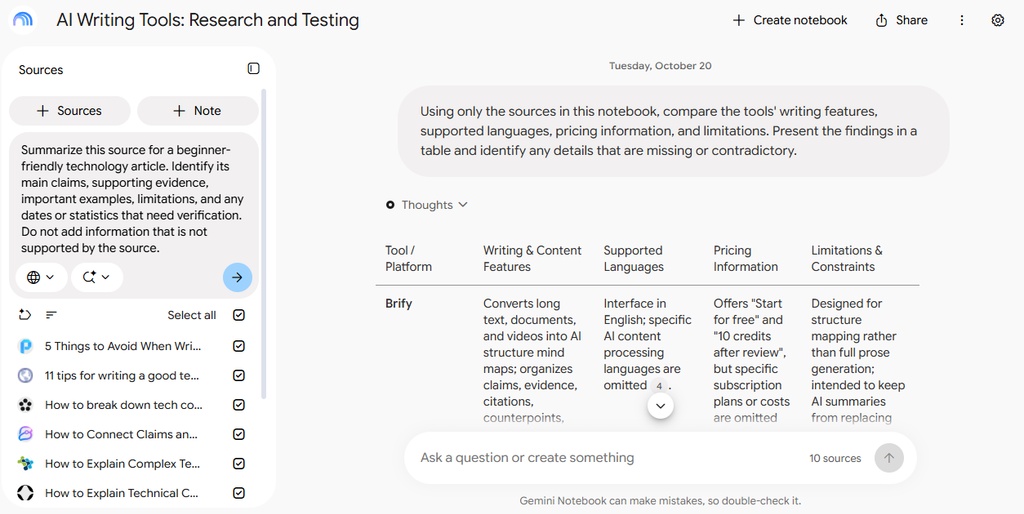
“Summarize this source for a beginner-friendly technology article. Identify its main claims, supporting evidence, important examples, limitations, and any dates or statistics that need verification. Do not add information that is not supported by the source.”
Review the summary against the original material. Save useful findings as notes, and record the source title or link alongside any facts you plan to use. This creates a research collection that is easier to review when you begin writing.

Step 4: Create a structured research note
Avoid keeping all your findings in a single, long block of text. Organize them into categories that match your writing process. A simple research-note structure could look like this:
Article topic: Best AI writing tools for freelancers
Main question: Which tools help freelancers complete writing tasks efficiently?
Key findings: Features, supported workflows, strengths, and limitations.
Evidence: Product documentation, test results, and reliable reports.
Examples: Specific tasks tested using each tool.
Questions to investigate: Pricing differences, usage limits, privacy terms, and unsupported claims.
Personal observations: What worked well, what failed, and what surprised you.
Sources to verify: Links and references for important claims.
You can create your own notes in NotebookLM and save useful chat responses. Keeping a consistent structure across projects makes research easier to revisit.
Step 5: Ask questions that support your article
General prompts often produce broad summaries. More specific questions usually provide more useful results. For example, instead of asking “Tell me about AI writing tools,” try:
“Using only the sources in this notebook, compare the tools’ writing features, supported languages, pricing information, and limitations. Present the findings in a table and identify any details that are missing or contradictory.”
Other useful questions include:
- Which claims have direct supporting evidence?
- What important limitations should a beginner understand?
- Which sources disagree about a feature or result?
- What practical examples would help explain this topic?
- Which questions remain unanswered by the current sources?
These questions help you identify gaps in your research before drafting the article.
Step 6: Build your article outline
Once you understand your research, ask NotebookLM to organize the findings into an outline.
For example:
“Create an outline for a beginner-friendly blog post about AI writing tools for freelancers. Include a search-intent-focused introduction, clear H2 and H3 headings, practical examples, benefits, limitations, and a conclusion. Map relevant research findings to each section and identify sections that need more evidence. Do not invent facts or statistics.”
Review the outline before using it. Rearrange sections to make the article easy to follow, remove repetitive headings, and add questions your target audience is likely to ask.
For SEO, include the main topic naturally in the title and relevant headings. Do not force the same keyword into every section.
Step 7: Write the article in your preferred editor
NotebookLM can support your writing process, but you do not have to write the final article inside it. Use the organized notes and outline in your preferred editor, such as Google Docs or WordPress.
As you draft:
- Explain concepts in your own words.
- Add original examples and practical instructions.
- Cite or link to sources where appropriate.
- Verify statistics, prices, product features, and other changeable information.
- Include your own analysis rather than repeating summaries from your sources.
For product reviews and comparisons, include actual testing details whenever possible. Explain what you tested, which criteria you used, and what limitations you encountered.
Step 8: Fact-check the finished draft
Before publishing, compare important statements in your article with the original sources. Pay particular attention to:
- Statistics and numerical claims
- Product features and pricing
- Security and privacy statements
- Dates and version information
- Technical recommendations
- Claims that could influence a reader’s decision
NotebookLM’s source references can make this process easier, but they do not guarantee that every answer is complete or correct. If a claim cannot be verified, remove it, qualify it appropriately, or find a stronger source.
Practical Example: Organizing Research for a Blog Post
Suppose you want to publish an article titled “Best Free AI Writing Tools for Beginners.” You have collected six sources: three official tool pages, two independent reviews, and one document containing your own test results.
Here is how you could organize the project.
| Research section | What to collect |
|---|---|
| Tool features | Writing assistance, editing, summarization, and other relevant functions |
| Free-plan limits | Usage restrictions, available features, and account requirements |
| Writing quality | Results from the same test prompt across tools |
| Ease of use | Setup steps, interface, and learning curve |
| Privacy | Relevant terms and official privacy documentation |
| Original testing | Your observations, examples, and screenshots |
Next, ask NotebookLM to summarize each source and compare the findings. Create notes for verified facts, test observations, and unanswered questions. Then use those notes to build your article outline.
For the original testing section, run the same writing task through each tool and document the results. Do not assume one tool is better simply because a review says so.
The final article will be more useful when readers can see how the tools performed in your tests, which features are actually available for free, and where each tool has limitations.
Best NotebookLM Prompts for Organizing Research Notes
The following prompts can help you manage different stages of your writing workflow.
Prompt 1: Extract key findings
“Review the selected sources and extract the five most important findings related to my article topic. For each finding, identify the supporting source, explain why it matters, and note any uncertainty.”
Prompt 2: Organize messy notes
“Organize these research notes into logical categories. Separate verified facts, source summaries, personal observations, possible article ideas, and unanswered questions. Preserve important details and flag duplicate or conflicting information.”
Prompt 3: Compare multiple sources
“Compare the sources on the main points relevant to my topic. Identify agreements, disagreements, differences in evidence quality, and missing information. Do not treat repeated claims as proof that they are correct.”
Prompt 4: Generate an article outline
“Create a clear, beginner-friendly article outline based on the research in this notebook. Use a logical progression, informative headings, practical examples, and a conclusion. Identify which sections require additional research.”
Prompt 5: Check research gaps
“Review the current research and list the questions a reader would reasonably expect this article to answer. Identify which questions are supported by existing sources and which require additional research.”
Prompt 6: Prepare a fact-checking checklist
“Create a checklist of factual claims in my planned article that require verification. Prioritize statistics, pricing, dates, technical claims, product features, and privacy statements. Include the relevant source for each claim when available.”
These prompts are starting points. Adjust them to fit your topic, audience, and research requirements.
Common Mistakes to Avoid When Using NotebookLM
NotebookLM can improve research organization, but it is not a replacement for editorial judgment.
Adding too many unrelated sources
A notebook filled with unrelated documents can make it harder to focus on the actual writing task. Keep each notebook centered on a project or a closely related subject.
Trusting AI summaries without checking the sources
A summary can omit context, misinterpret a claim, or miss an important qualification. Verify important findings in the original material before publishing.
Confusing other people’s claims with original research
If several articles repeat the same statistic, that does not necessarily make it reliable. Look for the original report or study whenever possible.
Publishing AI-generated text without meaningful editing
An outline or draft is only a starting point. Add expertise, original examples, useful analysis, and editorial judgment so that the finished article serves readers rather than merely repeating available information.
Forgetting to record your own observations
If you are reviewing a tool or testing a process, keep a record of what you personally tried and observed. This makes it easier to create distinctive, evidence-based content.
Ignoring privacy and copyright
Review the sensitivity of your documents before uploading them, and make sure you have permission to use the material where required. Avoid uploading confidential client information or private documents without appropriate authorization.
Is NotebookLM Good for Bloggers and Content Creators?
NotebookLM can be especially useful for bloggers, freelance writers, researchers, students, and content teams who work with multiple documents. It is a strong option when you need to understand a collection of sources, compare findings, keep notes organized, and prepare an evidence-based outline.
However, it is not a complete editorial workflow by itself. You may still need a writing editor, a task manager, SEO tools, image tools, and a separate system for tracking publication dates.
For a blogger managing multiple articles, a practical setup is to create one notebook per major article, save important findings, and keep a separate editorial calendar to track outlines, drafts, updates, and publication status.
The result is a more organized research process without forcing every part of content production into a single application.
Final Thoughts
NotebookLM for writers is a useful approach to turning scattered research into organized, actionable notes. By collecting reliable sources, asking focused questions, saving findings, and creating a structured outline, you can spend less time searching through documents and more time developing a useful article.
The key is to use AI as a research assistant rather than an unquestioned authority. Verify important claims, add your own perspective, and make sure every published article offers clear value to its intended readers.
Start with one writing project, gather a small set of reliable sources, and follow the workflow in this guide. Once you have a system that works, you can adapt it to future blog posts, tutorials, reviews, and research projects.
Stay Ahead with ControlOwl
Get the latest AI tools, software tips, tutorials, and technology insights delivered straight to your inbox.