Artificial intelligence tools can help you write articles, generate ideas, summarize documents, solve problems, and complete everyday tasks. However, the quality of their responses often depends on how you communicate with them.
If you have ever asked an AI tool a question and received a vague, generic, or irrelevant answer, the problem might not be the tool itself. Your prompt may need clearer instructions.
Learning how to write better AI prompts can help you get more accurate, relevant, and useful results from tools such as ChatGPT, Google Gemini, Claude, and other AI assistants.
The good news is that you do not need programming skills or technical knowledge to improve your prompts. A few simple techniques can make a significant difference.
In this guide, you will learn 10 practical prompt-writing techniques, see before-and-after examples, and discover reusable templates you can apply to writing, research, studying, business, and productivity.
What Is an AI Prompt?
An AI prompt is an instruction, question, or set of information that you provide to an artificial intelligence tool so that it can prepare a response according to the input.
For example, you might enter:
Basic prompt:
“Write about digital marketing.”
The AI can respond with a general introduction, but it does not know your intended audience, desired length, preferred writing style, or specific purpose.
Now consider a more detailed prompt:
Improved prompt:
“Write a beginner-friendly introduction to digital marketing for small business owners. Explain SEO, email marketing, social media marketing, and paid advertising using simple language. Include one practical example for each method and finish with five actionable tips. Keep the article under 1,000 words.”
This prompt provides clearer instructions and defines what a useful response should focus. The central principle is simple: the clearer your instructions, the easier it is for an AI tool to produce a response that matches your needs. However, detailed prompts are not always better. A short, direct question may be sufficient for a simple task.
Why Is Prompt Writing Important?
Prompt writing, often called prompt engineering, helps you guide AI tools toward specific outcomes instead of accepting whatever they generate by default.
Effective prompts can help you:
- Save time by reducing unnecessary revisions.
- Generate content that matches your audience and goals.
- Organize complex tasks into manageable steps.
- Receive answers in a useful format.
- Identify missing information before starting a task.
- Improve brainstorming, learning, research, and everyday productivity.
For example, a freelancer who asks an AI assistant to “write a proposal” may receive a generic document. A freelancer who provides the client’s business type, project requirements, budget, and preferred tone is more likely to receive a useful first draft.
Now, let’s explore the techniques you can start using today.
10 Techniques for Writing Better AI Prompts
1. Be Specific About What You Want
One of the most useful ways to improve AI responses is to replace confusing instructions with specific requests. Broad prompts leave many decisions to the AI. Specific prompts clarify the task, expected result, and important requirements.
Weak prompt:
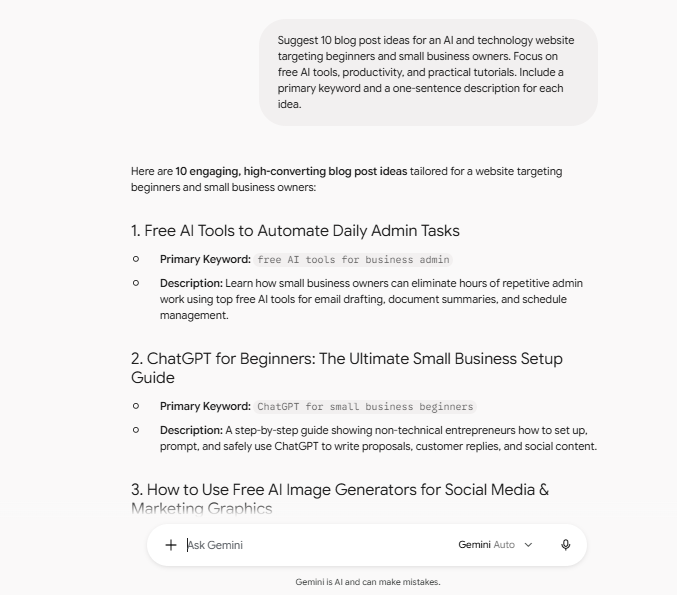
“Give me ideas for my website.”
Better prompt:
“Suggest 10 blog post ideas for an AI and technology website targeting beginners and small business owners. Focus on free AI tools, productivity, and practical tutorials. Include a primary keyword and a one-sentence description for each idea.”
The second prompt explains the topic, audience, quantity, and expected output.
How to apply this technique:
Before submitting a prompt, ask yourself:
- What exactly do I want the AI to do?
- How many results do I need?
- What details must the response include?
- What would make the answer useful to me?
You do not need to include every possible detail. Include the information that affects the output from AI tools.
2. Provide Context and Background Information
AI tools cannot automatically know every detail about your project, business, experience, or audience. Providing relevant context helps them generate responses that fit your situation.
Consider a business owner asking for marketing advice.
Weak prompt:
“How can I get more customers?”
Better prompt:
“I run a small online clothing store with a limited marketing budget. Most of my customers are between 18 and 35 years old. Recommend five affordable digital marketing strategies I can test over the next 30 days. For each strategy, explain the first steps, estimated effort, and a way to measure results.”
The additional context makes the response more relevant to the business owner’s needs.
Useful context to include:
- Your goal or project.
- Your target audience.
- Your current situation.
- Your budget or available resources.
- Relevant constraints or previous attempts.
Avoid sharing passwords, private customer records, or confidential business information with AI tools unless you have verified that the tool and its data-handling arrangements are protected.
3. Assign the AI a Relevant Role
You can guide an AI assistant by describing the perspective or expertise you want it to use. For example, you might ask it to respond as a teacher, editor, software developer, marketing strategist, or career adviser.
A role is most useful when it clarifies the type of analysis or communication you expect.
Weak prompt:
“Review my blog introduction.”
Better prompt:
“Act as an experienced content editor specializing in beginner-friendly technology blogs. Review the introduction below for clarity, readability, factual claims, and relevance to the target audience. Identify three specific improvements and provide a revised version.”
This prompt defines both the motive and the work to perform.
Important tip: A role does not guarantee expert-level accuracy. Treat it as guidance for the response, not proof that the AI has professional credentials or verified expertise.
4. Define the Target Audience
The same information may need to be explained differently depending on who will read it. A beginner may need definitions and simple examples. A software developer may prefer technical details, code snippets, and implementation considerations.
Weak prompt:
“Explain artificial intelligence.”
Better prompt:
“Explain artificial intelligence to someone who has never used an AI tool. Use everyday language, provide three examples from daily life, explain one important limitation, and avoid unnecessary technical terminology.”
You can adapt this technique to different audiences:
| Audience | Prompt direction |
|---|---|
| Beginners | Use simple language and explain unfamiliar terms. |
| Students | Include examples, summaries, and practice questions. |
| Business owners | Focus on practical applications, costs, and trade-offs. |
| Developers | Include technical details, code, and implementation steps. |
| General readers | Use clear explanations and relatable examples. |
When your audience is clear, the AI can better match its vocabulary, depth, content, and examples to the targeted reader.
5. Specify the Output Format
Even a useful answer can be difficult to apply if it arrives in the wrong format. You can request a checklist, table, numbered guide, email draft, comparison, outline, or step-by-step tutorial.
Weak prompt:
“Compare ChatGPT and Gemini.”
Better prompt:
“Compare ChatGPT and Google Gemini for everyday productivity. Present the comparison in a table with these columns: task, strengths, limitations, and best use case. Cover writing, brainstorming, research, and document work. Explain that features may vary by plan and change over time.”
The improved prompt tells the AI how to organize its answer and which areas to cover.
Common output formats include:
- Table: Compare products, methods, or options.
- Checklist: Complete a task without missing steps.
- Numbered list: Follow a process in order.
- Outline: Plan an article, report, or presentation.
- Step-by-step guide: Learn how to perform a task.
- JSON or code: Produce structured data or technical output when needed.
Choose the format based on how you intend to use the result.
6. Set Clear Constraints and Requirements
Constraints tell an AI tool what to include, what to avoid, and which limits to respect. They can cover word count, tone, length, budget, available tools, technical requirements, or other conditions.
Weak prompt:
“Write a social media post about AI.”
Better prompt:
“Write a Facebook post introducing three practical uses of AI for small businesses. Use a friendly, conversational tone. Keep it under 120 words, include one clear takeaway, and end with a question that encourages discussion. Avoid exaggerated claims and excessive emojis.”
The second prompt makes the expected result easier to evaluate.
Useful constraints include:
- Word or character limits.
- Required topics or examples.
- Preferred tone and reading level.
- Available time, tools, or budget.
- Topics or claims to avoid.
- A required structure or final deliverable.
Remember that some AI tools may not follow constraints perfectly. Review the output of AI Tools and request corrections when necessary.
7. Give Examples of the Result You Want
Examples can be especially helpful when you need a particular writing style, structure, or level of detail. This approach is sometimes called few-shot prompting when you provide examples within the prompt.
Suppose you want AI to create short descriptions for a technology blog.
Prompt without an example:
“Write a short description for an article about AI tools.”
Prompt with an example:
“Write short descriptions for beginner-friendly technology articles. Follow this pattern: ‘Learn how [tool or technique] works, when to use it, and how to get started with practical examples.’
Example: ‘Learn how AI chatbots work, when they are useful, and how to create your first chatbot with practical examples.’
Now write a description for an article about free AI image generators. Do not copy the example word for word.”
Providing an example communicates the structure and tone you want more clearly than a generic AI tone.
Best practice: Use examples that represent your actual expectations. If you provide several examples, make sure they are consistent with one another.
8. Break Complex Tasks Into Smaller Steps
Asking an AI tool to complete a large project in a single prompt can lead to shallow coverage, overlooked requirements, or a poorly organized result. For complicated tasks, divide the work into stages.
Imagine you want to publish an SEO-focused article. Instead of asking the AI to research keywords, create an outline, write 2,500 words, generate metadata, and prepare social posts all at once, use a sequence of prompts.
Step 1: Plan the article
Identify the audience, search intent, primary keyword, and questions the article should answer.
Step 2: Create an outline
Organize the topic into logical H2 and H3 headings. Identify where examples and original insights belong.
Step 3: Draft the content
Write each section with practical explanations, examples, and appropriate supporting details.
Step 4: Review and improve
Check factual claims, remove repetition, improve readability, and add original observations before publishing.
This approach allows you to review each stage before moving forward. You can also correct mistakes early instead of rewriting an entire document.
9. Ask the AI to Identify Uncertainty and Verify Important Claims
AI-generated responses can contain false information, outdated details, fabricated references, or confident-sounding statements that have not been verified.
For research-heavy or technical tasks, explicitly ask the AI to distinguish established facts from uncertain information.
Weak prompt:
“Tell me the latest features of an AI writing tool.”
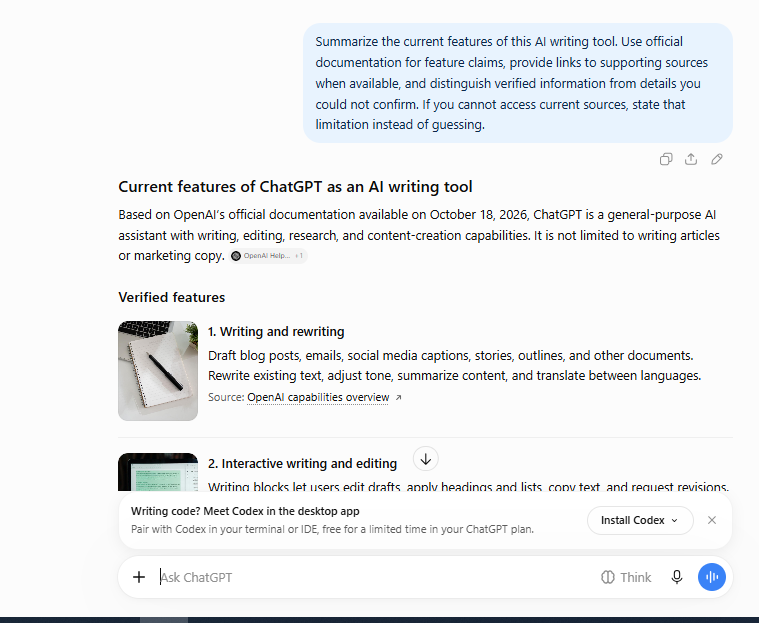
Better prompt:
“Summarize the current features of this AI writing tool. Use official documentation for feature claims, provide links to supporting sources when available, and distinguish verified information from details you could not confirm. If you cannot access current sources, state that limitation instead of guessing.”
When using an AI tool with web browsing, this instruction can help guide the research process. It does not guarantee that every claim or citation will be correct.
For important claims, verify information against reliable primary sources, such as official documentation, original research, government publications, or relevant experts.
This technique is particularly useful for:
- Product comparisons.
- Technical instructions.
- Health, legal, or financial information.
- Current prices, plans, and features.
- Statistics and research summaries.
Remember: Asking an AI to verify its own answer is not a substitute for independent verification.
10. Improve the Response Through Follow-Up Prompts
You do not need to get everything right in your first prompt. One of the most practical techniques is to treat AI as a follow-up assistant. Start with a reasonable prompt, review the result, and ask for targeted changes.
For example:
Initial prompt:
“Create a beginner’s guide to using AI for productivity.”
After receiving the response, you might follow up with:
- “Add three realistic examples for freelancers.”
- “Explain the technical terms in simpler language.”
- “Remove repetitive sections and keep the most useful advice.”
- “Add a step-by-step example using a free AI tool.”
- “Identify claims that require fact-checking.”
- “Rewrite the introduction to address the reader’s main problem.”
Each follow-up should address a specific weakness rather than asking the AI to make the answer “better” without explaining what that means.
A practical rule: Review the output first, identify the biggest problem, and give the AI one clear instruction to address it.
A Simple Formula for how to write better AI prompts
You can combine several of these techniques into one reusable structure.
The AI prompt formula
Use the components relevant to your task. You do not need all of them every time.
Role: What perspective should the AI use?
Task: What exactly should it do?
Context: What background information matters?
Audience: Who is the result for?
Constraints: What rules or limits should it follow?
Format: How should the answer be organized?
Quality check: What should be reviewed or verified?
Here is an example using the formula:
“Act as a content editor for a beginner-friendly AI and technology blog. Write a guide explaining how freelancers can use AI to save time. The target audience is freelancers with limited technical experience. Include five practical use cases, a real-world example for each, and the main limitation of each use case. Use clear headings, simple language, and a helpful tone. Keep the article around 1,500 words. Avoid unsupported statistics and identify claims that need verification.”
This prompt gives the AI a clear direction without requiring complicated terminology.
Common AI Prompt-Writing Mistakes to Avoid
Even experienced AI users can get disappointing results when their instructions are unclear, or their expectations are unrealistic.
| Mistake | Better approach |
|---|---|
| Asking vague questions | State the task and intended outcome. |
| Providing no background | Include relevant context and constraints. |
| Adding too many unrelated instructions | Organize requirements by priority. |
| Expecting perfect accuracy | Verify important facts independently. |
| Accepting the first draft | Review the output and request specific changes. |
| Asking for sources without checking them | Open the original sources and confirm the claims. |
| Treating AI-generated content as original research | Add your own testing, experience, analysis, and evidence. |
| Sharing confidential information unnecessarily | Use non-sensitive examples and review the tool’s privacy terms. |
Another common mistake is assuming that longer prompts always produce better answers. A concise prompt can work very well when the task is straightforward. The goal is not to write the longest possible instruction; it is to provide enough information for the AI to understand what you need.
How to Use Better Prompts for SEO Content
If you use AI to support a website or blog, prompt-writing skills can make your content workflow more organized. However, SEO performance depends on more than prompts or keyword placement.
Here are some ways to apply the techniques in content creation.
1. Start with search intent.
Ask the AI to identify what a reader wants to learn from a particular search query. Check whether the intended article actually answers that need.
2. Create an outline before drafting.
Request logical headings, useful subtopics, and places where practical examples or original research would help.
3. Add real value.
Include your own observations, original comparisons, screenshots of actual tests, documented procedures, and clear limitations where appropriate.
4. Use keywords naturally.
Include your primary keyword in relevant places, such as the title, introduction, URL, and an appropriate heading when it fits naturally. Avoid repeating it unnaturally.
5. Edit and verify the finished article.
Check facts, links, examples, readability, grammar, and whether the article answers the reader’s question more usefully than a generic overview.
For websites seeking Google AdSense approval, publishing AI-assisted articles alone does not guarantee approval. Focus on original value, a good visitor experience, useful content, and compliance with Google’s publisher policies.
Conclusion
Learning how to write better AI prompts is a practical skill that can help you get more value from modern AI tools. You do not need to master complicated terminology to get started.
Begin with three habits: be specific, provide relevant context, and explain what a successful result should look like. Then use examples, clear constraints, and follow-up prompts when a task requires more precision.
The most effective approach is to experiment with your own tasks, compare the results, and refine your instructions based on what works. Over time, you will develop a collection of prompts that suit your writing, learning, business, and productivity needs.
Start with one technique from this guide and apply it to your next AI conversation. A small improvement in your instructions can make the entire process more useful.
Stay Ahead with ControlOwl
Get the latest AI tools, software tips, tutorials, and technology insights delivered straight to your inbox.