
Finding a free AI image generator on the internet is easy. However, finding one that creates high-quality images, follows your instructions, renders readable text, and lets you use the results for your blog or business is much harder.
Some AI tools are excellent at creating realistic photographs. Others are better at illustrations, product concepts, or images containing words. A generator might produce impressive results but restrict the number of images you can create, while another might offer generous free access with limitations on commercial use or privacy.
For bloggers, freelancers, designers, and small businesses, these differences matter. You need more than an attractive image: you need a tool that fits your workflow and gives you permission to use the result for your intended purpose.
In this guide, I explain how to compare six popular AI image-generation options using identical prompts. The comparison focuses on image quality, prompt accuracy, text rendering, free access, watermarks, and commercial-use restrictions.
Testing note: The tool descriptions provide a research-based starting point; they are not fabricated test scores. Free-plan limits and licensing terms should be checked again on the publication date.
Quick Comparison: Free AI Image Generators
The right tool depends on what you want to create. These six options cover general-purpose image generation, graphic design, text-heavy artwork, and more advanced creative workflows.
| AI image generator | Best use case | What to examine in the free plan |
|---|---|---|
| Google Gemini | General-purpose images and conversational editing | Current generation limits, output quality, and image provenance |
| ChatGPT Images | Creating and refining images through conversation | Image-generation availability, limits and editing behavior |
| Microsoft Designer | Social graphics and everyday visual content | Personal-use terms and available generation features |
| Adobe Firefly | Creative work and image editing | Free generation allowance and applicable usage terms |
| Ideogram | Posters, thumbnails and typography | Text accuracy, free credits and public-image settings |
| Leonardo AI | Artistic concepts, game assets and stylized visuals | Token costs, available models and free-tier rights |
These tools do not all provide the same type of output. Some focus on generating images directly, while others combine image generation with editing or graphic-design features. Therefore, the fairest comparison evaluates each tool against the same tasks rather than assuming every platform has identical capabilities.
How I Compared the Free AI Image Generators
A useful comparison needs a consistent method. If one generator receives a detailed prompt and another receives only a few words, the results cannot be compared fairly.
For a practical test, use the same three prompts across all six tools. Start with a realistic photograph, move to an image containing text, and finish with a detailed illustration.
Record the date, account type, model or mode selected, image dimensions, generation settings, and number of attempts. Use the default settings where possible, and avoid repeatedly regenerating images for one tool while accepting the first result from another.
Test 1: Photorealistic Image Quality
Use this prompt:
Create a realistic editorial photograph of a small modern coffee shop in Kathmandu, Nepal, on a rainy morning. A barista prepares coffee behind the counter, warm pendant lights illuminate the wooden interior, and raindrops are visible on the window. Natural colors, realistic skin texture, accurate hands, soft natural lighting, professional photography, horizontal 16:9 composition. No text, no logos, no watermark.
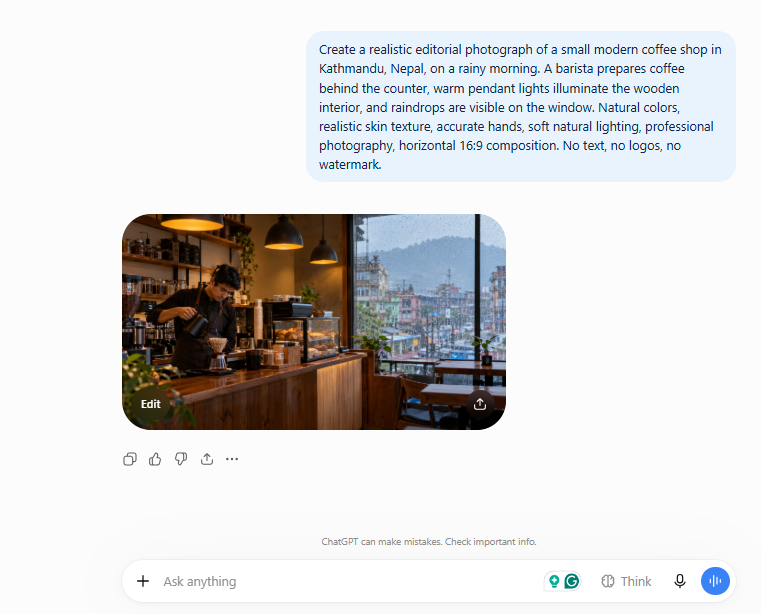
This test evaluates whether a generator can follow a detailed description while producing a believable scene.
Check the following:
- Do the people, furniture, and coffee equipment look realistic?
- Are the hands, faces, and reflections convincing?
- Does the image include the rainy window and warm interior?
- Are the colors and lighting consistent?
- Does the composition match the requested horizontal format?
A visually attractive image can still fail if it ignores important instructions. For example, a beautiful café scene without rain or a visible barista does not fully satisfy the prompt.
What to record: Save the original output from each generator. Place the six images in a comparison gallery and explain which details each one handled well or poorly.
Test 2: Text Rendering and Typography
Use this prompt:
Design a clean promotional poster for a fictional technology workshop. The headline must read exactly “AI TOOLS FOR EVERYONE”. Include the subtitle “Learn. Create. Automate.” and a small call-to-action reading “Register Today”. Use a modern blue-and-white color scheme, strong typography, balanced spacing and a professional technology-event design. Ensure all three text elements are spelled correctly and clearly readable.
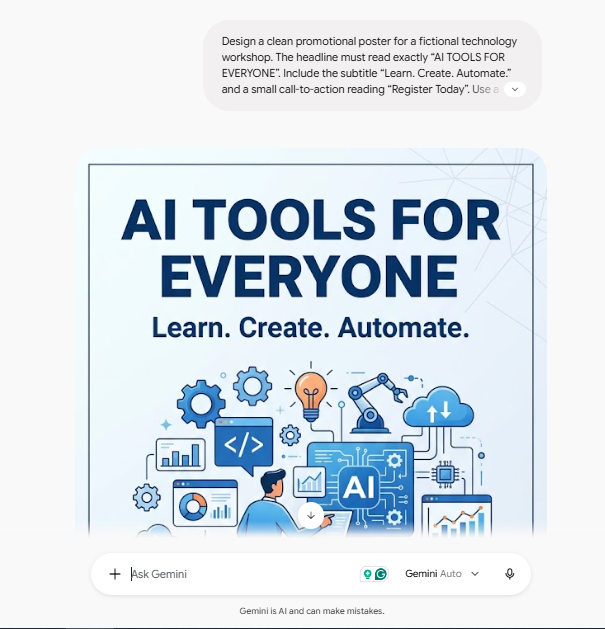
This test is important because text inside generated images has historically been a difficult task for image models. Performance varies by model, prompt, and generation settings.
Inspect each result carefully. Do not assume that words are correct simply because they look convincing at thumbnail size.
Check:
- Is the main headline spelled correctly?
- Does the subtitle match the prompt exactly?
- Is the call-to-action readable?
- Are letters distorted, duplicated, or missing?
- Is the text positioned clearly against the background?
For posters, advertisements, and social-media graphics, accurate wording can matter more than decorative detail.
Ideogram is a particularly relevant candidate for this test because it specializes in typography-oriented image generation. However, its actual performance should be judged from the output you capture, not from its reputation alone.
What to record: Include cropped screenshots of the text areas, especially any spelling errors. A side-by-side image comparison provides much stronger evidence than simply stating that one tool is better.
Test 3: Detailed Illustration
Use this prompt:
Create a polished editorial illustration showing a friendly robotic assistant helping a small-business owner organize a workspace. Include a laptop, notebook, coffee cup, desk plant and a few floating digital icons representing email, analytics and automation. Use a consistent modern vector-art style, clean shapes, balanced composition and a restrained purple, blue and white palette. No text, no logos, horizontal 16:9 composition.
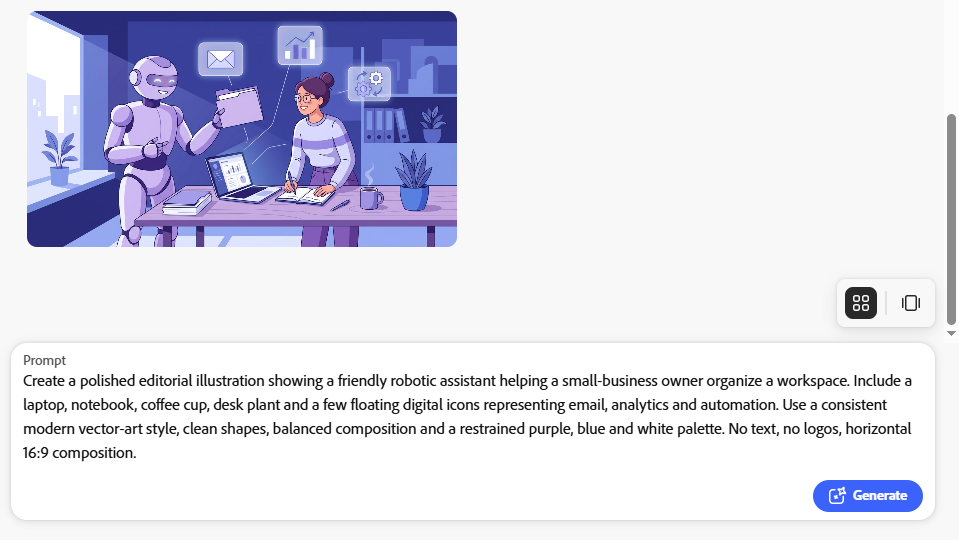
This test measures visual consistency, composition, and the ability to handle several objects in one scene.
Look for missing objects, inconsistent illustration styles, strange proportions, and unnecessary visual clutter. Check whether the robot and business owner look like they belong in the same illustration.
This type of image is especially useful for technology blogs because it can support tutorials, explainers, and articles about productivity tools.
How to Score the Results
Use the same scoring criteria for every generator. Rate each category from 1 to 5, where 1 means poor and 5 means excellent.
| Criterion | What earns a high score |
|---|---|
| Prompt accuracy | The output includes the requested subjects and details |
| Visual quality | Lighting, composition, detail, and consistency are convincing |
| Text accuracy | Requested wording is correct and readable |
| Ease of use | The interface and generation process are straightforward |
| Free-plan usefulness | The available allowance is practical for your needs |
Calculate the quality score using the first three criteria, which directly evaluate the images. Assess ease of use and free-plan usefulness separately so that a tool does not win simply because it offers more credits.
For example, if a tool scores 4, 5, and 3 for prompt accuracy, visual quality, and text accuracy, its average image-quality score is 4 out of 5.
Do not fill in scores based on expectations. Complete the tests first and retain the outputs so readers can verify your conclusions.
1. Google Gemini: A General-Purpose Starting Point
Google Gemini is worth evaluating if you want to create images by describing a scene in ordinary language. Its conversational interface can also be useful when you need to refine an idea instead of repeatedly writing a complete prompt from scratch.
For example, after generating a café image, you might ask for warmer lighting, a wider composition, or fewer background objects. Test whether these changes preserve the important parts of the original scene.
What to test
- Whether the generator follows long, detailed prompts.
- How naturally it responds to requests for revisions.
- Whether the free allowance is sufficient for several experiments.
- What image-provenance information is attached to generated files.
Do not assume that every account receives the same image-generation allowance. Availability and limits can vary, and Google’s terms should be checked before using outputs commercially.
Best potential fit: Bloggers and beginners who want to generate and refine general-purpose images through a conversational interface.
2. ChatGPT Images: Creating and Refining Visual Ideas
ChatGPT Images is another option for people who prefer an interactive creative process. Instead of relying entirely on a single prompt, you can describe an image and then request changes to particular details.
This approach can be helpful when creating article illustrations. You might first generate a robot working at a desk and then request a simpler background, more space for a headline, or a different color palette.
However, conversational editing should be tested for consistency. A revision may improve one part of an image while unexpectedly changing another.
What to test
- Does it follow the main prompt accurately?
- Can it make specific changes without altering the whole scene?
- Does it render the poster text correctly?
- How many useful generations can you make with your free account?
Image-generation access and usage limits may vary by plan and over time. Check the current product interface rather than assuming that unlimited free generation is available.
Best potential fit: Users who want to develop an image through conversation rather than learning a complicated design workflow.
3. Microsoft Designer: Convenient Visual Content
Microsoft Designer combines AI-assisted image creation with graphic-design features. It is relevant for people who want to produce social graphics, invitations, promotional visuals, and other everyday designs.
Its value is not limited to the image itself. A workflow that lets you create a visual and then place it into a designed layout may save time compared with generating an image in one application and finishing it in another.
Nevertheless, a design tool and a pure image generator are not exactly the same. When comparing results, distinguish between the quality of the generated image and the quality of any templates, layout tools, or text added afterward.
What to test
- Whether the generated scene matches your prompt.
- How easy it is to adapt an image for a social post or blog graphic.
- Whether the free features meet your required dimensions.
- Which uses are permitted under Microsoft’s current terms.
Microsoft’s published Designer FAQ describes the product as free to use, but specifies a personal, non-commercial licence for Designer. Review the current terms carefully before choosing it for client work, advertisements, or monetized commercial projects.
Best potential fit: Personal projects and everyday visual design, subject to the applicable licence.
4. Adobe Firefly: Creative Work and Editing
Adobe Firefly is designed for generative creative workflows, including image generation and image editing. It is worth testing when you need to create a visual concept or modify an existing composition.
For a technology blog, you might generate an illustration and then explore whether the editing features can remove distractions, extend the background, or make room for a headline.
Adobe’s approach to commercially oriented creative tools may be attractive to businesses, but it is important to distinguish between general usage permissions and additional legal protections available under particular paid plans.
What to test
- The quality and consistency of generated images.
- How well its editing features handle local changes.
- The number of generations included in the free offering.
- Whether the applicable terms permit your intended commercial use.
Adobe currently advertises limited free daily generations across its generative features. The exact allowance and available models should be checked on its official plan page before testing.
Do not interpret Adobe’s commercial positioning as a blanket guarantee that every output is free from intellectual-property risk. Review the current terms for the particular plan and feature you use.
Best potential fit: Creators who value image editing and a broader creative workflow, especially when licensing considerations are important.
5. Ideogram: A Candidate for Text-Heavy Images
Ideogram deserves particular attention in a comparison involving typography. Many image generators can create an attractive background but struggle with exact wording, which limits their usefulness for posters, banners, and thumbnail concepts.
The second test in this article is therefore especially relevant to Ideogram.
Generate the workshop poster and inspect all three text elements. Do not judge the result solely by the main headline; the subtitle and call-to-action matter too.
What to test
- Whether the exact headline is reproduced.
- Whether smaller text remains legible.
- How well the layout balances text and imagery.
- How many free credits are available and how quickly generation completes.
- Whether free outputs are public by default.
Ideogram’s free access has used limited credits, and its account and privacy arrangements should be reviewed before uploading confidential assets or creating client material. Check the current plan details rather than relying on an older credit allowance.
Best potential fit: Poster concepts, text-led visuals, event graphics and thumbnail designs—provided your own test confirms that the text is accurate enough.
6. Leonardo AI: Artistic Concepts and Stylized Images
Leonardo AI is worth including when your work involves illustrations, character concepts, game assets, or more stylized visual content.
The robot-and-business-owner prompt provides a practical way to compare its output with more general-purpose tools. Look for a coherent illustration style, consistent proportions and good placement of small objects.
Also pay attention to the platform’s token system. A free plan that appears generous may become less useful when particular models, settings or image dimensions consume more tokens per generation.
What to test
- Whether the selected model matches the requested art style.
- How well it handles multiple objects and characters.
- How many generations your available tokens actually purchase.
- Whether free outputs have different privacy or ownership terms from paid outputs.
Do not assume that a lack of visible watermarks means an image is automatically cleared for commercial use. Read the terms applicable to your account and the specific output.
Best potential fit: People exploring stylized artwork, character concepts, and creative visual variations.
Free Credits, Watermarks and Commercial Rights: What Matters Most?
A good-looking image is only one part of the decision. If you plan to use a generator regularly, examine the practical restrictions before committing to a workflow.
1. Free Credits and Generation Limits
A free plan might provide a daily allowance, weekly credits, monthly credits, or access that varies according to demand. Some platforms also charge different amounts of credits for different models or settings.
During testing, record the allowance shown in your account and the actual number of images generated before you hit a limit.
Distinguish between a generation and an image. One generation request might return several variations, while another might produce just one image. This affects how useful a free allowance really is.
2. Watermarks and Image Provenance
A visible watermark can make an image unsuitable for a clean blog header or client deliverable. However, the absence of a visible watermark does not necessarily mean the file contains no provenance information.
Some AI systems attach metadata or use technologies intended to identify AI-generated content. That information is different from a visible logo placed over the picture.
Inspect the downloaded file and review the provider’s documentation. Do not remove a watermark or other identifying mark in violation of the applicable terms.
3. Commercial-Use Restrictions
This is one of the most important checks for a monetized website.
Before using an AI-generated image, determine whether the terms allow your specific use. Examples include:
- Publishing the image in an article supported by advertising.
- Using it in a business’s social-media campaign.
- Including it in a client presentation.
- Selling it as a digital download or printed product.
These uses are not necessarily treated identically. A tool may permit some commercial uses but restrict redistribution, resale, public sharing, or other activities.
Also distinguish permission to use an output from a guarantee of exclusive ownership or copyright protection. Those are different legal questions.
For commercial projects, retain a copy of the applicable terms and the date you checked them. If the licence is unclear, choose a different source or obtain appropriate advice before publishing.
4. Privacy and Public Images
Some platforms make generated images public or provide community galleries. Others offer different privacy options depending on the subscription.
Avoid uploading confidential business documents, unpublished product designs, or private client images unless the provider’s terms and privacy controls are suitable.
For a commercial workflow, check who can see your prompts, uploads, and generated outputs, as well as how the platform handles them.
Which Free AI Image Generator Is Best for Different Tasks?
There is no single winner for every use case. A generator that produces a convincing photograph may not be the best choice for a poster with exact wording.
Use these recommendations as a shortlist for your own testing rather than as a ranking based on unverified results.
| Your main requirement | Tools worth testing first |
|---|---|
| Realistic editorial images | Gemini, ChatGPT Images, Firefly |
| Posters with readable text | Ideogram, ChatGPT Images |
| Social graphics and layouts | Microsoft Designer, Adobe Firefly |
| Stylized illustrations | Leonardo AI, ChatGPT Images |
| Editing through conversation | ChatGPT Images, Gemini |
| Commercial creative workflows | Adobe Firefly, with current terms reviewed |
If you publish articles frequently, also consider the time needed to generate, select, edit, and compress an image. A tool that produces a usable result quickly may be more valuable than one that creates a slightly more attractive image after many attempts.
How to Create Better Images With Free Text-to-Image AI
You do not always need a complicated prompt to produce a useful result. A clear description with a few specific details often gives you a better starting point.
Describe the subject and setting
Instead of writing “a business owner,” try “a small-business owner reviewing sales figures on a laptop at a bright wooden desk.”
Specify the visual style
State whether you want an editorial photograph, a clean vector illustration, a watercolor painting, or a cinematic scene. This reduces ambiguity about the intended appearance.
Mention composition and dimensions
For blog images, specify a horizontal composition and leave room for cropping. A 16:9 target is useful for many article headers, although the actual output dimensions depend on the tool.
Avoid unnecessary details
A prompt with too many competing instructions can produce a cluttered result. Include the most important objects, lighting, and colors, and add refinements only when necessary.
Inspect the output before publishing
Look closely at hands, faces, reflections, small objects, and any text. Check that the image does not contain an unintended logo or misleading detail.
For a blog article, resize and compress the selected image, use a descriptive filename, and write meaningful alt text that describes what the image actually shows.
Should You Use AI-Generated Images on a Blog?
AI-generated images can help technology blogs create original illustrations for tutorials, comparisons, and explainers. They are especially useful when a suitable photograph is difficult to obtain or when an article needs a visual concept that does not exist in the real world.
However, images should support the information in an article rather than serve as decoration alone.
For a comparison like this one, the strongest visual evidence is a gallery of actual outputs from the same prompts. Include the tool name and test date with each image, and explain the meaningful differences.
Do not present an AI-generated mockup as a screenshot of a real product interface. If you use AI artwork to illustrate a concept, label it appropriately where readers could otherwise mistake it for a real photograph or product screenshot.
Also remember that AI-generated images do not replace useful written content, original analysis, or accurate licensing information. A detailed comparison with transparent testing methods is more useful than a page filled with generic images and unsupported claims.
Final Verdict: Which Free AI Image Generator Should You Choose?
The best free AI image generator depends on your priorities. If you want to create general-purpose images, begin by comparing Gemini and ChatGPT Images. If your work involves posters or graphics containing words, test Ideogram carefully.
For layouts and promotional materials, evaluate Microsoft Designer. For image editing and creative workflows, consider Adobe Firefly. For stylized illustrations and character concepts, add Leonardo AI to your shortlist.
Before choosing a tool, compare three things: the quality of its output, the amount of useful free access it provides, and whether its terms allow the way you intend to use the images.
Most importantly, do not select a winner based on a single impressive result. Run the same prompts, save the outputs, record your observations, and repeat the process when major models or free plans change.
The practical recommendation: Choose the tool that consistently produces usable images for your actual work—not simply the one that looks best in a promotional example.
Stay Ahead with ControlOwl
Get the latest AI tools, software tips, tutorials, and technology insights delivered straight to your inbox.