
If you use AI for daily tasks like writing emails, making Excel sheets, fixing code, and making schedules, then the two most-used AI assistants are ChatGPT and Claude.
Both can help with writing, summarizing documents, researching topics, helping with code, brainstorming ideas, and doing assignments. On the surface, they have similar services.
However, the differences become easier to identify when you stop asking them simple questions and start giving them specific tasks.
Instead of asking, “Which AI is smarter?”, a more useful question is:
Which AI assistant works better according the task assigned?
To find out, I compared ChatGPT and Claude across five practical categories to identify which is best:
- Writing
- Research
- Coding
- Summarization
- Brainstorming
I used the same basic task for both assistants and looked at the quality of the resulting work, how much editing was required to get the best response, and how useful the response would be in a real-life scenario.
The goal isn’t to declare one better AI out of thousands. Different people use AI differently according to the task, and the best tool for a software developer may not be the best choice for someone writing blog posts or researching a business idea.
Instead, this comparison looks at where each assistant can fit into everyday work.
How I made the comparison
A fair comparison needs more than asking each chatbot a different question and deciding which response gives a better result.
The test protocol uses the following rules:
- Give both assistants exactly the same prompt.
- Use the same input files and reference material where applicable.
- Record the model name and version shown in each product.
- Record the subscription plan and whether browsing or other tools are enabled.
- Save the complete outputs for later evaluation.
- Apply the same scoring criteria to both responses.
- Verify factual claims and run code instead of assuming that a confident answer is correct.
Testing date: October 9, 2026, is the date this test was prepared. It should not be presented as the date of completed hands-on testing unless the tests are actually run on that date. If the tests are conducted later, record the real test date and update this article.
ChatGPT vs Claude in short
Before getting into the individual tests, here’s the basic comparison:
| Task | ChatGPT | Claude |
|---|---|---|
| Writing | Strong | Strong |
| Research | Strong | Strong |
| Coding | Strong | Strong |
| Summarization | Strong | Strong |
| Brainstorming | Strong | Strong |
| Long-form documents | Strong | Strong |
| Following detailed instructions | Strong | Strong |
| Editing and rewriting | Strong | Strong |
| Complex workflows | Strong | Strong |
There isn’t a useful single winner across all of these categories.
The more interesting differences seem when you look at how each assistant approaches the task and how accurate the command is required to be for the final result.
Test 1: Writing
Writing is probably the most used by people in their daily lives. So I started with a relatively realistic assignment with both AI tools.
The prompt
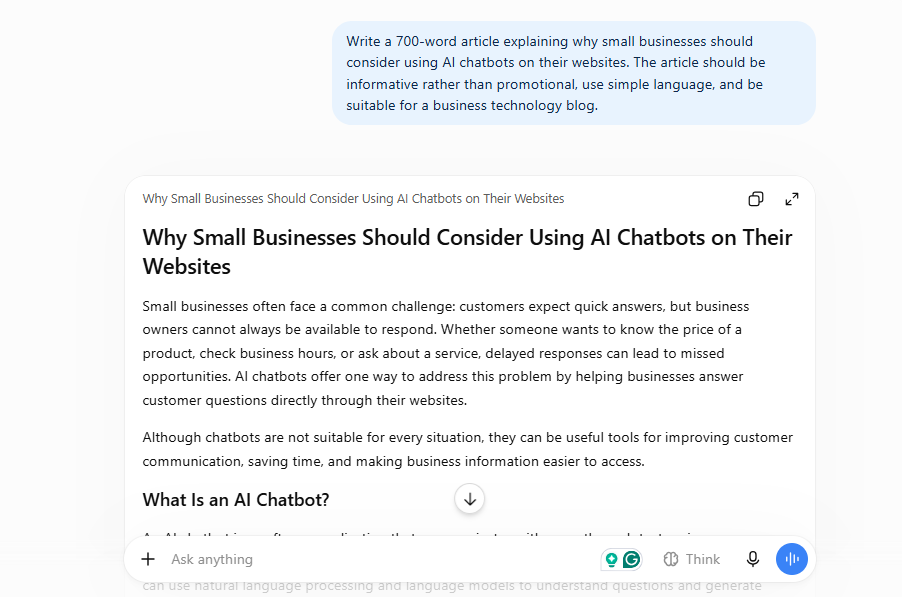
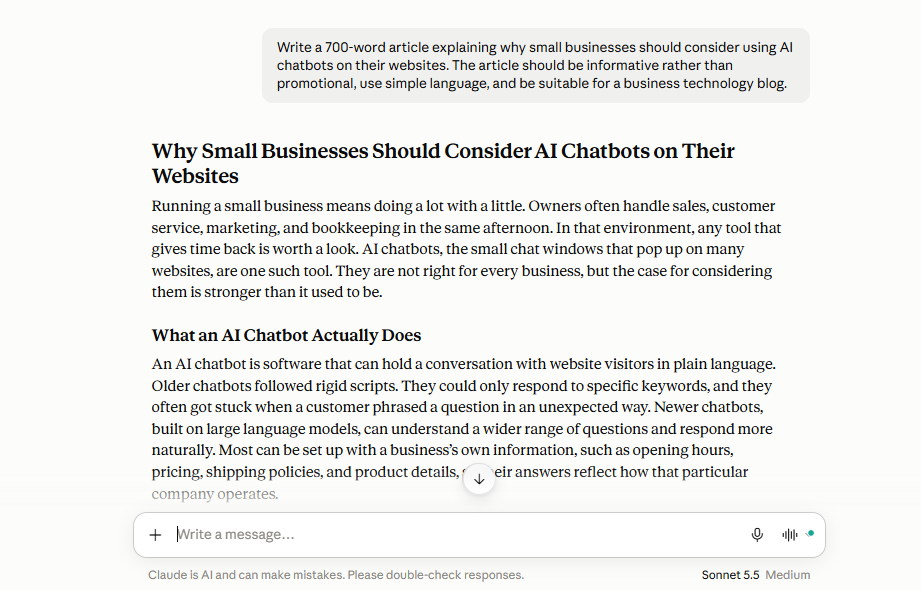
“Write a 700-word article explaining why small businesses should consider using AI chatbots on their websites. The article should be informative rather than promotional, use simple language, and be suitable for a business technology blog.”
This tests several things at once:
- Organization
- Tone
- Readability
- Ability to follow instructions
- Avoidance of unnecessary repetition
- Quality of explanations
ChatGPT
ChatGPT generally approaches this type of request by creating a structured article with a clear introduction, several sections, and a conclusion.
A typical structure might look like:
- What AI chatbots are
- Why businesses use them
- Customer support benefits
- Lead generation
- Common limitations
- How businesses should choose a chatbot
- Conclusion
One advantage is that the output can be easily adapted, and the content is in a standard structure format.
You can ask it to make the article more detailed, add examples, shorten it, optimize headings and subheadings, create an FAQ section, or rewrite it for a particular audience. For someone producing content regularly, that flexibility is useful.
Claude
Claude can produce a similar article to ChatGPT. One thing that often stands out is its ability to maintain a natural, readable tone in longer pieces. It can also be useful when the writer wants to provide a large amount of context before asking for the final article.
For example, you can give it:
- A brand voice
- An existing article
- Writing guidelines
- Audience information
- Product information
and ask it to create a new piece based on those instructions.
Writing takeaway
Both assistants are capable writing tools. The bigger difference isn’t whether they can write a good article. It’s how much editing you need to do afterward.
If you’re publishing AI-assisted content, don’t simply copy the first response from either tool. Use AI for drafting and structuring, then add your own research, examples, experience, screenshots, and conclusions. That is particularly important if you’re trying to build a website around original content.
Test 2: Research
Research is more difficult than writing because a convincing answer isn’t necessarily a correct answer. For this test, I would use a question requiring multiple sources.
The prompt
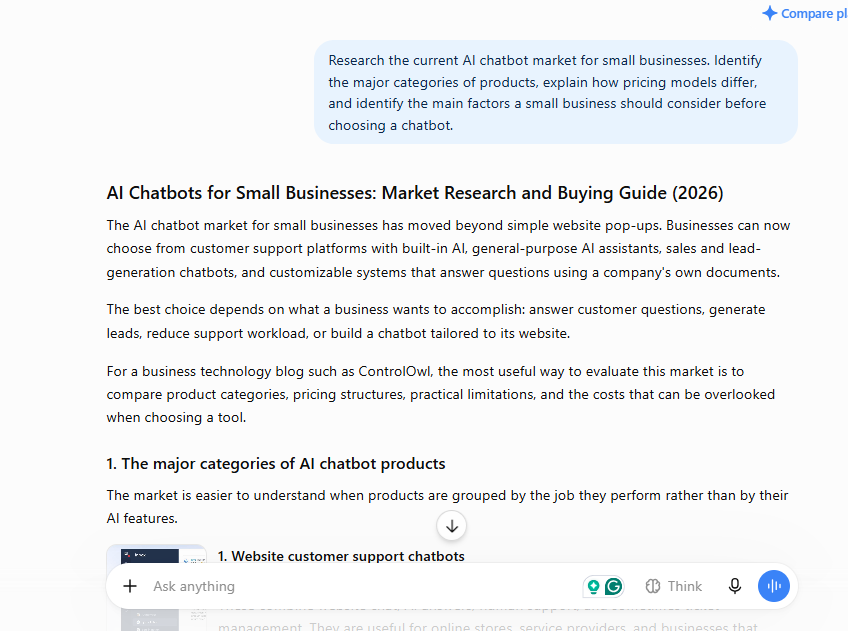
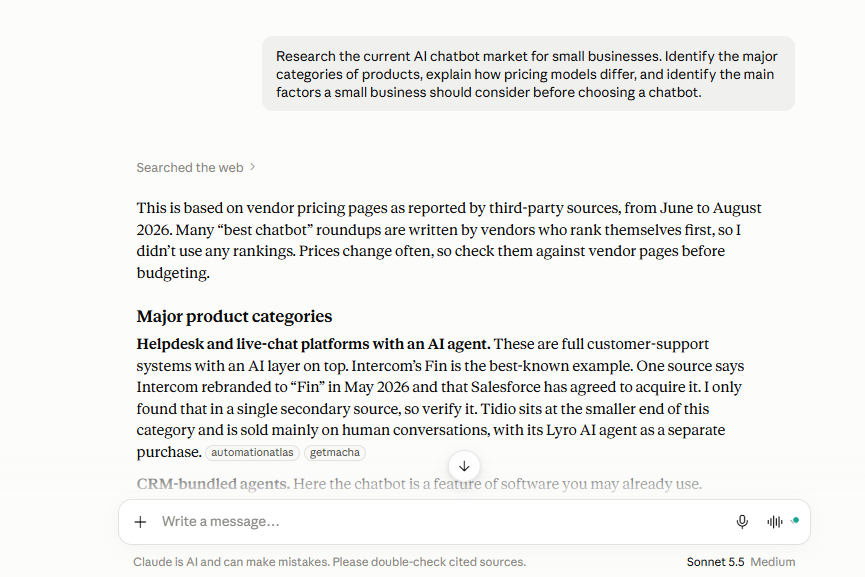
“Research the current AI chatbot market for small businesses. Identify the major categories of products, explain how pricing models differ, and identify the main factors a small business should consider before choosing a chatbot.”
This tests whether an AI assistant can:
- Find relevant information
- Distinguish current information from older information
- Compare companies
- Identify patterns
- Explain uncertainty
- Cite sources where appropriate
ChatGPT
ChatGPT can be particularly useful when the task involves several stages.
For example, the workflow can be:
Step 1: Find relevant information.
Step 2: Compare the products.
Step 3: Identify differences.
Step 4: Organize the information.
Step 5: Turn the research into an article.
This makes it useful for research-heavy content projects. However, there is an important rule:
Always verify important facts against the original source.
Pricing changes.
Features change.
Product names change.
Companies discontinue plans.
Product Logo Change
An AI-generated answer can become outdated, as it is using previous data for training its model.
Claude
Claude can also be useful for research, particularly when you provide the source material yourself. For example, you can give it several documents and ask:
“Compare these five sources and identify where they agree and disagree.”
That turns Claude into a powerful analysis tool. But again, the quality of the research depends heavily on the quality and freshness of the underlying information.
Research takeaway
For research, don’t judge an AI assistant only by how confident its answer sounds.
Judge it by:
- Source quality
- Citation quality
- Accuracy with source
- Ability to distinguish facts
For important research, the sources matter more than the explanation.
Test 3: Coding
This is where the comparison becomes more interesting and how good the AI tools are.
I used a practical programming task rather than asking:
“Can you write code?”
The prompt
“Build a simple JavaScript function that accepts an array of products and returns only products that are in stock and cost less than $100. Explain the code and include an example input and output.”
A useful answer should contain:
- Working code
- Correct filtering logic
- Explanation
- Example input
- Example output
- Standard coding pattern
A good coding assistant should also understand follow-up requests that align with the previous response.
For example:
“Now modify it so the user can specify the maximum price.”
And then:
“Add TypeScript types.”
And finally:
“Write unit tests for it.”
That tests whether the assistant can maintain context across multiple modifications.
ChatGPT
ChatGPT is particularly useful for iterative coding workflows. You can start with a small function and progressively turn it into something more complicated.
For example:
Version 1: Basic JavaScript function.
Version 2: Add error handling.
Version 3: Convert to TypeScript.
Version 4: Add tests.
Version 5: Explain how to integrate it into an existing project.
That workflow is often more useful than generating an entire application in one prompt.
Claude
Claude is also capable of handling substantial coding tasks and large amounts of surrounding context. That becomes particularly useful when you’re working with an existing project.
Instead of giving the AI only a single function, you can provide:
- Existing code
- Error messages
- Project requirements
- Documentation
- Multiple files
and ask it to reason about the changes.
Coding takeaway
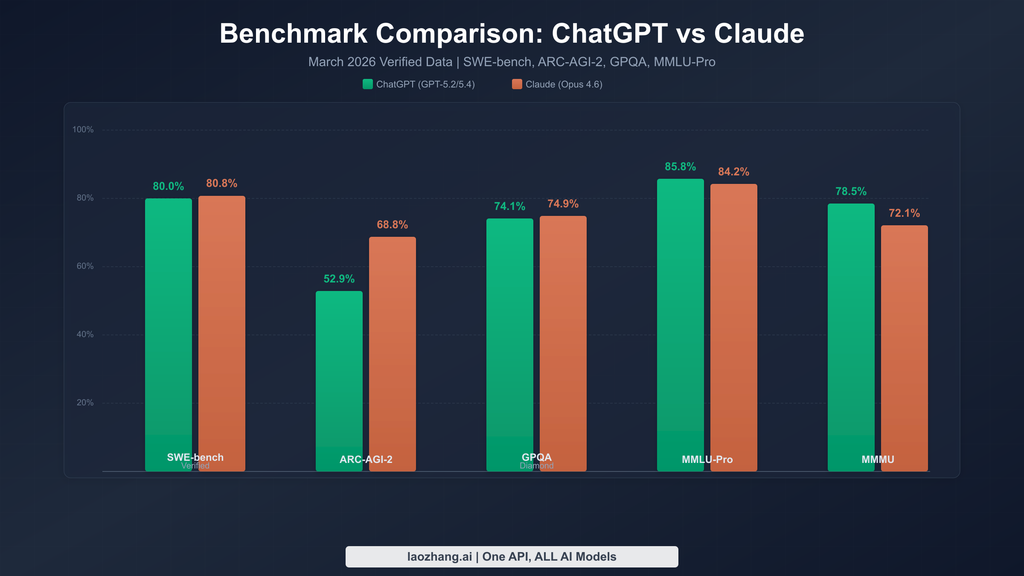
For developers, I wouldn’t choose an AI assistant based on one coding benchmark.
Instead, test it with your own codebase.
Give both assistants the same bug.
Give them the same feature request.
Give them the same error message.
Then compare:
- Correctness
- Number of changes required
- Understanding of the existing code
- Explanations
- Ability to debug follow-up problems
That’s much closer to real programming work.
Test 4: Summarization
Summarization sounds easy. It isn’t. A good summary needs to preserve the important information while removing unnecessary detail. I would test this using a long document rather than a short paragraph.
The prompt
“Summarize this document in 500 words. Identify the five most important points, explain the author’s main argument, and list any important numbers or dates.”
This tests whether the assistant can:
- Identify important information
- Preserve context
- Avoid adding information
- Distinguish major points from minor details
- Follow a specific output format
ChatGPT
ChatGPT can turn long documents into structured summaries, bullet points, tables, outlines, or executive summaries.
This makes it useful for people who regularly work with:
- Reports
- Research papers
- Meeting notes
- Business documents
- PDFs
- Technical documentation
You can also ask follow-up questions about the document rather than repeatedly reading the entire source yourself.
Claude
Claude is also well suited to document analysis. This can be especially useful when the task isn’t simply:
“Summarize this.”
but instead:
“Summarize this document and then explain the three strongest arguments and three potential weaknesses.”
That changes summarization into analysis.
Summarization takeaway
The best test is not whether an AI can produce a short summary. Almost every modern AI assistant can do that. The better test is whether it can retain the details you actually care about and preserve important information and facts.
That’s why I recommend creating a scoring sheet before testing. For example:
| Criterion | Score |
|---|---|
| Main argument identified | /5 |
| Important facts retained | /5 |
| Numbers preserved | /5 |
| No unsupported claims | /5 |
| Follows requested format | /5 |
Test 5: Brainstorming
Finally, I tested one of the most subjective tasks: brainstorming.
The prompt:
“Give me 20 realistic ideas for a small website business based around AI. Avoid generic ideas and explain the target customer and potential revenue model for each.”
This isn’t about finding one correct answer. It’s about generating useful possibilities.
ChatGPT
ChatGPT can be useful for rapidly expanding an initial idea. For example:
“Give me 10 ideas.”
Then:
“Remove anything requiring a large team.”
Then:
“Give me ideas that can be built by one developer.”
Then:
“Focus on businesses that can generate recurring revenue.”
The conversation becomes a filtering process. That is often more valuable than the original brainstorm.
Claude
Claude can take a similar approach. One useful method is to give the AI your constraints before brainstorming.
For example:
- Solo founder
- Limited budget
- No physical inventory
- B2B customers
- Subscription model
- Can be launched within 30 days
Then ask for ideas.
The resulting list is generally much more useful than simply asking:
“Give me startup ideas.”
Brainstorming takeaway
The quality of brainstorming depends heavily on the quality of your constraints.
The best prompt isn’t:
“Give me good ideas.”
It’s:
“Here are my resources, limitations, audience, skills, and goals. Generate ideas that fit those constraints.”
ChatGPT vs Claude: What Actually Matters?
After looking at these five categories, I think the most useful conclusion is that the difference isn’t simply:
ChatGPT = good
or
Claude = good
Both are capable general-purpose AI assistants able to help most of the daily tasks.
The more important question is:
Which one fits your task?
If your work involves frequent research, writing, coding, document analysis, brainstorming, and tool-assisted workflows, you should test both with your actual tasks. Don’t rely entirely on someone else’s decision.
How I Would Test Them Properly
If you’re seriously deciding between ChatGPT and Claude, create a personal benchmark.
Take 20 tasks you actually perform.
For example:
Writing
- Write an email
- Rewrite an article
- Create a blog outline
- Improve a landing page
Research
- Research a company
- Compare products
- Find current pricing
- Summarize competing viewpoints
Coding
- Fix a bug
- Write a function
- Explain existing code
- Add a feature
Documents
- Summarize a report
- Extract key numbers
- Compare two documents
- Create an action list
Brainstorming
- Generate business ideas
- Create content ideas
- Develop product features
- Find alternative approaches
Then give both assistants the same instructions.
Score each response based on what actually matters to you.
The Most Important Thing I Learned
AI assistants shouldn’t replace your judgment and originality. They should increase your ability to do useful work and give you better ideas. The best workflow I’ve found is not:
Ask AI → copy answer → publish
It’s:
Give AI context → get a draft → verify important information → improve it → add your own judgment → produce the final work.
That distinction is particularly important for writers, researchers, developers, and business owners.
AI can dramatically reduce the time required to get from a blank page to a useful first draft.
But the final quality still depends on the person using it and the output they are hoping.
ChatGPT vs Claude: Which Should You Use?
Instead of choosing based on a universal ranking, start with your primary use case.
If you mostly need an assistant for general everyday work, test both using the same collection of tasks.
If your work is primarily writing, compare the editing and revision process. If you’re a developer, test them against your real codebase. If you do research, compare source quality and verification requirements.
If you work with large documents, test both using the documents you actually work with. And if you use AI for brainstorming, judge the usefulness of the ideas rather than the number of ideas generated.
The important thing is not which assistant produces the most impressive demo. It’s which one consistently helps you finish your work.
Limitations of this comparison
A five-test benchmark is useful, but it cannot establish which AI assistant is universally better.
Results can change with model updates, subscription plans, tool availability, prompt wording, and the difficulty of the input. A single response also cannot establish consistent performance. For a stronger comparison, repeat important tests several times and report both successes and failures.
The findings should therefore be understood as a snapshot of the tested configurations on the documented test date, rather than a permanent ranking of ChatGPT and Claude.
Final Thoughts
ChatGPT and Claude both have capacity far beyond simple question-and-answer tools.
They can now participate in many parts of an important and technical workflow:
Writing → Research → Coding → Analysis → Summarization → Brainstorming
But there’s no reason to treat the choice as permanent. AI tools change quickly. Features change. Models are updated. Pricing changes. New capabilities appear.
A tool that fits your workflow today may not be the best fit six months from now. That’s why the most useful comparison isn’t a final winner. It’s a repeatable test. Take your real work.
Give the same tasks to both assistants. Measure the things that matter to you. Then choose the tool — or combination of tools — that helps you accomplish that work with less friction and better results.
And if you’re building an AI-focused workflow, don’t be afraid to use more than one assistant.
Sometimes the most productive setup isn’t ChatGPT vs. Claude. It’s ChatGPT + Claude, with each one used where it fits your workflow best.
Stay Ahead with ControlOwl
Get the latest AI tools, software tips, tutorials, and technology insights delivered straight to your inbox.