Artificial intelligence tools such as ChatGPT, Google Gemini, and Claude can help you write notes, summarize documents, brainstorm ideas, solve problems, and automate everyday tasks. However, the quality of their responses often depends on how you explain in the prompt.
A confusing instruction may produce a generic answer, while a clear and well-structured prompt can generate a response that is more relevant, useful, and easier to apply.
This is where prompt engineering plays an important role. Prompt engineering is the practice of designing, testing, and improving instructions given to AI systems to get more useful results. You do not need to be a programmer or an AI expert to be better at prompt engineering.
With a few practical techniques, beginners can improve the quality of AI-generated responses for work, education, content creation, and everyday productivity.
In this guide, you will learn what prompt engineering is, how prompts work, which techniques to use, and how to write better prompts with practical examples. You will also find reusable templates that you can adapt to your own tasks.
What Is Prompt Engineering?
Prompt engineering is the process of creating and refining instructions, questions, or examples provided to an AI model to guide its response toward a desired outcome.
A prompt can be as simple as asking an AI assistant to explain a concept or as detailed as specifying a role, task, audience, constraints, examples, and output format.
For example, consider these two prompts.
Basic prompt:
“Write about digital marketing.”
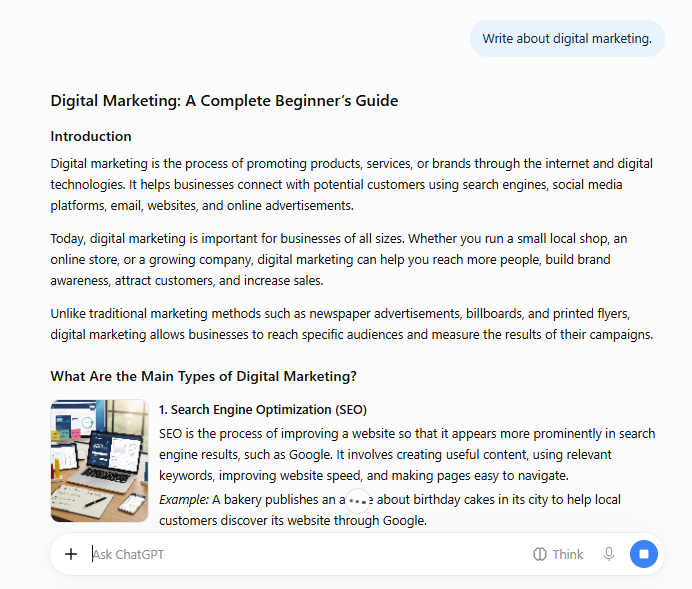
Improved prompt:
“Write a beginner-friendly introduction to digital marketing for small business owners. Explain SEO, email marketing, social media marketing, and paid advertising using simple language. Include one practical example for each method and finish with five actionable tips. Use clear headings and keep the article under 1,000 words.”

The second prompt provides more information about the task, audience, scope, and expected structure. As a result, the AI has clearer guidance about what to produce.
Prompt engineering does not guarantee a perfect response. AI systems can still misunderstand instructions, miss important details, or generate incorrect information. The goal is to reduce ambiguity and make the output more useful.
Why Is Prompt Engineering for Beginners Important?
Learning to write effective prompts can help you use AI tools more efficiently. Instead of repeatedly correcting an unsatisfactory response, you can provide better instructions from the beginning.
Here are some practical benefits.
1. Get More Relevant Answers
Specific prompts help an AI assistant understand what you need. Mentioning the subject, purpose, audience, and desired result reduces the chance of receiving an overly broad response.
2. Save Time on Revisions
A well-defined prompt can reduce unnecessary back-and-forth. For example, asking for an email with a professional tone, a clear subject line, and a specific call to action is more useful than simply asking an AI to write an email.
3. Improve Content Quality
Content creators can use prompts to develop outlines, generate interview questions, organize research notes, and identify gaps in a draft. Human review remains essential for accuracy, originality, and appropriate tone.
4. Support Learning and Problem-Solving
Students and professionals can ask AI systems to explain difficult concepts, compare approaches, or break complicated tasks into manageable steps. The prompt should specify the person’s current knowledge level and learning objective.
5. Make AI More Useful for Everyday Work
Prompt engineering can support routine tasks such as summarizing meeting notes, organizing project plans, drafting customer support replies, and creating spreadsheet formulas.
The most important principle is simple: give the AI enough context to understand the task, but avoid adding irrelevant information.
The 6 Essential Elements of a Good AI Prompt
There is no single formula that works for every AI task. However, six elements provide a useful starting point for many everyday prompts.
1. Role
Describe the perspective or expertise you want the AI to adopt.
Examples:
- Act as a beginner-friendly technology tutor.
- Act as a content editor specializing in clear explanations.
- Act as a customer support assistant for an online store.
A role can influence the style and perspective of a response, but it does not guarantee professional expertise or factual accuracy.
2. Task
State exactly what you want the AI to do.
Weak instruction: “Help me with SEO.”
Better instruction: “Create an SEO content outline for a beginner’s guide to website security.”
A clear task gives the AI a specific objective.
3. Context
Explain the background information that affects the answer. For example, a marketing plan for a local bakery will differ from one for a software company. Providing relevant information about the business, audience, budget, or problem helps the AI produce a more appropriate response.
Only include information that is necessary for the task, and avoid sharing passwords, confidential business records, or sensitive personal information.
4. Constraints
Set boundaries for the response.
Constraints may include:
- Word count or length.
- Reading level.
- Tone and writing style.
- Topics to include or exclude.
- Available budget, time, or resources.
For example: “Use simple English, avoid unexplained technical terms, and keep the explanation under 600 words.”
5. Output Format
Tell the AI how to organize the result. You might request a numbered list, comparison table, email draft, checklist, article outline, or step-by-step tutorial. A specified format makes the response easier to review and use.
6. Success Criteria
Explain what a good result should accomplish. For example: “The guide should help a beginner complete the setup without assuming prior programming knowledge.”
Success criteria are particularly useful for complex tasks because they clarify what the finished response needs to achieve.
A Simple Formula for Writing Better Prompts
You can combine these elements into a reusable formula:
Role + Task + Context + Constraints + Output Format + Success Criteria
Consider this example:
“You are a technology educator. Write a beginner-friendly guide to protecting a WordPress website from common security threats. The audience consists of website owners with limited technical knowledge. Cover strong passwords, software updates, backups, and two-factor authentication. Use simple English, explain technical terms, and keep the article between 1,000 and 1,200 words. Organize it with descriptive headings, practical examples, and a final security checklist. The reader should be able to identify and complete the most important basic security steps.”
You do not need to include all six elements in every prompt. A simple factual question may require only a direct question. More complex tasks benefit from additional context and constraints.

7 Prompt Engineering Techniques Beginners Should Learn
Once you understand the basic structure, you can experiment with techniques that improve clarity and consistency.
1. Zero-Shot Prompting
Zero-shot prompting means asking an AI model to perform a task without providing examples of the desired output.
Example:
“Explain what cloud computing is in simple English. Give three everyday examples and list two advantages and two limitations.”
This approach works well for common tasks such as explanations, summaries, brainstorming, and straightforward writing requests.
When to use it: Start with zero-shot prompting whenever the task is simple, and your instructions are already clear.
2. Few-Shot Prompting
Few-shot prompting means providing a small number of examples to demonstrate the pattern, format, or style you want the AI to follow.
For example:
“Classify each customer message as Positive, Negative, or Neutral.
Example 1: ‘The delivery was fast, and the product works well.’ → Positive
Example 2: ‘My order arrived damaged.’ → Negative
Example 3: ‘I received the package today.’ → Neutral
Now classify this message: ‘The product is useful, but shipping took too long.'”
The examples help communicate the classification pattern more clearly than a label request alone.
Few-shot prompting can be helpful when you need consistent labels, structured descriptions, or a particular writing format.
When to use it: Use examples when describing the desired pattern is harder than demonstrating it.
3. Task Decomposition
Complex tasks often produce better results when divided into smaller steps. Instead of asking an AI to research, plan, write, optimize, and review a complete marketing campaign in one instruction, break the work into stages.
For example:
- Identify the target audience and its main problems.
- Generate campaign ideas that address those problems.
- Select ideas based on budget and feasibility.
- Draft the campaign content.
- Review the content against a checklist.
This approach makes it easier to inspect intermediate results and correct mistakes before moving forward.
When to use it: Use task decomposition for long articles, business plans, technical projects, and multi-stage workflows.
4. Providing Explicit Constraints
Constraints help prevent a response from drifting away from your requirements.
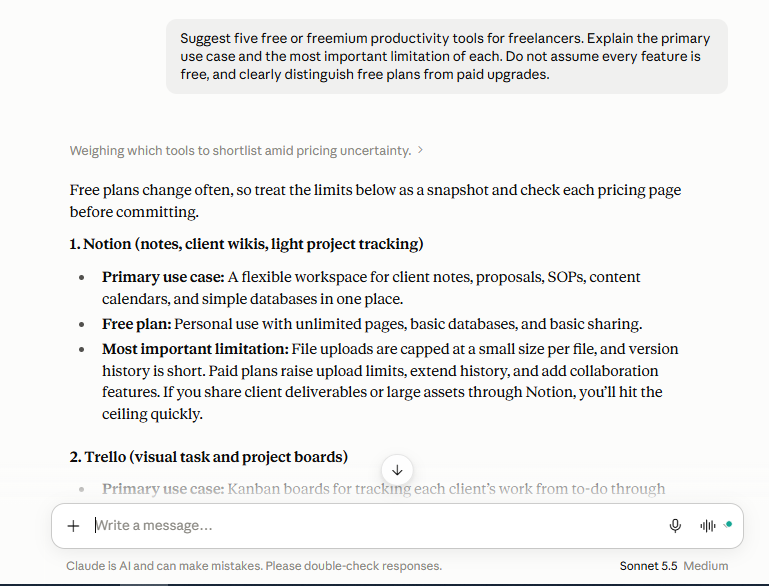
For example:
“Suggest five free or freemium productivity tools for freelancers. Explain the primary use case and the most important limitation of each. Do not assume every feature is free, and clearly distinguish free plans from paid upgrades.”
The instruction establishes the number of suggestions and requires limitations to be included. Constraints should be realistic. Adding too many unnecessary requirements can make prompts harder to follow.
When to use it: Use constraints when the response must fit a specific budget, length, format, audience, or set of requirements.
5. Asking for Structured Output
Structured output is useful when you need to compare options or transfer information into another workflow.
Example:
“Compare three project management tools for a freelancer. Organize the comparison into a table with columns for primary use, free-plan limitations, ease of use, and best-fit user. If current pricing or features are uncertain, identify them as items that need verification.”
A table makes differences easier to scan, although the accuracy of the information still needs to be checked.
When to use it: Use structured output for comparisons, reports, checklists, research summaries, and planning.
6. Iterative Prompting
Iterative prompting means improving a response through successive instructions rather than expecting the first attempt to be perfect. Imagine that an AI generates an article introduction that sounds too formal. You can follow up with:
“Rewrite the introduction in a more conversational tone. Keep the main idea, remove repetitive sentences, and explain the topic in language suitable for a beginner.”
You can then ask for a factual review, a clearer structure, or additional examples. Each revision should address a specific problem. Changing too many requirements at once can make it difficult to understand which instruction improved the result.
When to use it: Use iterative prompting for writing, coding, design concepts, and any task where the first response needs refinement.
7. Asking the AI to Identify Uncertainty
AI systems can generate plausible-sounding information that is incomplete or incorrect. Asking for uncertainty to be identified can help you review the result more carefully.
Example:
“Explain the main security risks of using public Wi-Fi. Separate established general guidance from claims that depend on the device or network configuration. Identify any points that require verification and suggest reliable sources to consult.”
This instruction encourages the assistant to distinguish between general guidance and information requiring further investigation. It does not guarantee that every uncertainty or error will be identified.
When to use it: Use this technique for technical explanations, product comparisons, research, and decisions where accuracy matters.
5 Before-and-After Prompt Examples
The following examples show how you can turn vague instructions into more actionable prompts.
Example 1: Writing a Blog Post
Weak prompt:
“Write a blog about AI tools.”
Improved prompt:
“Create a beginner-friendly article outline about AI tools for freelancers. Organize it by use case, including writing, research, design, and productivity. For each section, suggest practical examples, potential limitations, and questions readers may have. Avoid unsupported claims about pricing or performance.”
Why it works: The improved prompt defines the audience, topic boundaries, structure, and quality expectations.
Example 2: Learning a Technical Concept
Weak prompt:
“Explain APIs.”
Improved prompt:
“Explain APIs to someone who has never written code. Start with a simple real-world analogy, then explain requests, responses, and API endpoints. Include one practical example using a weather application and finish with five key terms and their definitions.”
Why it works: The prompt specifies the knowledge level, teaching sequence, example, and final format.
Example 3: Creating a Work Plan
Weak prompt:
“Make me productive.”
Improved prompt:
“Create a one-day work plan for a freelancer with six hours of available work time. Prioritize the three tasks that have the nearest deadlines, include short breaks, and leave 30 minutes for unexpected work. Present the schedule as a table and state any assumptions.”
Why it works: The AI receives practical limits and a clear deliverable.
Example 4: Troubleshooting a Website
Weak prompt:
“Fix my website.”
Improved prompt:
“Help me troubleshoot a WordPress website that loads slowly on mobile. First, list the information needed to identify the cause. Then explain how to check page size, server response time, image optimization, caching, and third-party scripts. Start with diagnostic steps that do not require editing code, and explain how to interpret the findings.”
Why it works: The prompt asks for a diagnostic process rather than an unsupported guess about the cause.
Example 5: Summarizing a Document
Weak prompt:
“Summarize this document.”
Improved prompt:
“Summarize the supplied document for a busy manager. Start with a five-bullet executive summary, then list the key decisions, deadlines, risks, and unresolved questions. Do not invent information that is missing from the document. Mark uncertain details as unclear.”
Why it works: The desired audience and output are explicit, and the instruction discourages unsupported additions.
Reusable AI Prompt Templates
You can copy and adapt these templates for everyday tasks.
Template 1: General-Purpose Prompt
“You are [role]. Help me [specific task]. The relevant background is [context]. The intended audience is [audience]. Follow these requirements: [constraints]. Present the result as [format]. A successful result should [success criteria]. If essential information is missing, ask clarifying questions.”
Template 2: Research Prompt
“Research [topic] for [audience or purpose]. Organize the findings into [requested sections]. Distinguish verified information from uncertain claims, include reliable sources where available, and identify details that need further verification. Do not invent citations or statistics. Present the findings as [format].”
Always open and check the cited sources yourself. An AI-generated citation is not proof that a source exists or supports the claim.
Template 3: Content Creation Prompt
“Create a [content type] about [topic] for [target audience]. The main objective is [objective]. Use a [tone] tone and organize the content with [structure]. Include [required elements] and avoid [unwanted elements]. The finished piece should be [length or format]. Prioritize accuracy, useful examples, and original analysis over repetition.”
Template 4: Coding and Debugging Prompt
“Help me troubleshoot [problem] in [language, framework, or platform]. My current setup is [relevant environment], and the observed error is [exact error]. Explain the likely causes, identify what information is missing, and propose a step-by-step diagnostic process. If you provide code, explain where it belongs and how to test it safely. Do not assume that unverified changes will fix the problem.”
Review and test AI-generated code before using it in production, particularly when it affects authentication, payments, data, or security.
Template 5: Decision-Making Prompt
“Help me compare [options] for [specific goal]. My priorities are [criteria], and my constraints are [budget, time, or other limits]. Present the advantages, disadvantages, risks, and trade-offs of each option in a table. Separate known facts from assumptions, and identify what I should verify before deciding.”
Common Prompt Engineering Mistakes to Avoid
Even a well-designed prompt can fail when it contains unclear or conflicting instructions. Watch out for these common mistakes.
Being Too Vague
A prompt such as “Make this better” does not explain what needs improvement. Specify whether you want better clarity, accuracy, tone, organization, or conciseness.
Giving Conflicting Instructions
“Write a comprehensive explanation in exactly 50 words” may be difficult to satisfy if the topic requires substantial detail. Decide which requirement matters most or divide the task into a short summary and a longer explanation.
Assuming the AI Knows Your Context
Unless relevant information is available in the conversation or provided through an enabled feature, the AI may not know your business, audience, previous decisions, or internal processes. Include the context needed for the task.
Asking Too Many Unrelated Questions at Once
Combining unrelated requests can lead to incomplete answers. Group related tasks together and separate major stages when necessary.
Treating Every Answer as Fact
Fluent writing does not guarantee correctness. Verify important statistics, quotations, legal requirements, technical recommendations, and product information using appropriate sources.
Ignoring Privacy
Do not paste passwords, private customer records, confidential contracts, or other sensitive information into an AI tool without understanding the tool’s data handling, access controls, and applicable organizational policies. Remove identifying details when they are unnecessary.
Reusing Prompts Without Testing Them
A prompt that works well for one model or task may not work equally well for another. AI models, available features, and instructions change over time. Test important prompts against realistic examples and refine them when the results fall short.
How to Test and Improve Your Prompts
Prompt engineering is a practical skill. You improve it by comparing results and learning which instructions make a meaningful difference.
Follow this simple process:
Step 1: Define the desired result.
Decide what the response needs to accomplish before writing the prompt.
Step 2: Write a clear first version.
Include the task, relevant context, and essential requirements. Avoid unnecessary detail.
Step 3: Run the prompt.
Review the output against your original goal instead of judging it only by its writing style.
Step 4: Identify specific weaknesses.
Look for missing information, incorrect claims, unclear explanations, irrelevant content, or formatting problems.
Step 5: Change one or two instructions.
For example, add an audience description or require a practical example. Keeping revisions focused makes comparisons more useful.
Step 6: Compare the results.
Use the same task and evaluation criteria when comparing prompt versions. Record which version produces the more useful response.
Step 7: Save successful prompts.
Keep reusable prompts in a document or organized prompt library. Include notes about the task, model tested, date, and limitations.
For important workflows, test prompts on several representative examples rather than relying on one successful result.
Is Prompt Engineering Different for ChatGPT, Gemini, and Claude?
The core principles of prompt engineering apply to many AI assistants, including ChatGPT, Google Gemini, and Claude. All can benefit from clear tasks, relevant context, examples, constraints, and a defined output format.
However, their features, interfaces, context limits, integrations, and response styles can differ. A prompt that works well in one system may need adjustment in another.
When comparing AI assistants, try the following method:
- Give each assistant the same task and relevant background.
- Use the same requirements and output format.
- Evaluate accuracy, completeness, clarity, and usefulness.
- Verify factual claims independently.
- Repeat the test with several tasks before drawing conclusions.
Avoid declaring one tool universally superior based on a single response. The best choice depends on the task, the available features, and the quality of the output for your particular needs.
A Beginner’s Practice Exercise
The best way to understand prompt engineering is to practice it.
Start with this weak prompt:
“Give me ideas for a business.”
Now improve it by answering these questions:
- Who is the business intended for?
- What skills, interests, or resources are available?
- What budget or time constraints apply?
- How many ideas are needed?
- What information would make the ideas easier to evaluate?
Your revised prompt might look like this:
“Suggest five online business ideas for a beginner with basic computer skills and a limited startup budget. For each idea, explain the target customer, the problem it solves, the initial resources required, the main risks, and a low-cost way to test demand. Present the results in a comparison table. Clearly distinguish assumptions from verified information, and do not promise specific earnings.”
Compare the original and revised prompts. Does the second response provide more actionable information? Are the limitations clearer? Can you make another improvement by specifying a country, a budget range, or a particular skill?
This exercise demonstrates that prompt engineering is not about finding magic words. It is about communicating your objective and evaluating whether the result meets your needs.
Final Thoughts
Prompt engineering is a practical skill that helps you communicate more effectively with AI tools. You do not need complicated terminology or a perfect prompt to get started. Begin with a clear task, provide relevant context, set realistic constraints, and specify the output you need.
When the first response is not good enough, identify what is missing and revise the prompt. For more important tasks, compare results, check factual claims, and test the instructions against multiple examples.
The most effective prompt is not necessarily the longest one. It is the one that gives the AI enough information to produce a useful result while leaving you able to review, verify, and improve that result.
Start by choosing one everyday task—writing an email, learning a concept, or organizing a project—and try the techniques in this guide. With practice, you can build a collection of reliable prompts that make AI more useful in your daily work.
Stay Ahead with ControlOwl
Get the latest AI tools, software tips, tutorials, and technology insights delivered straight to your inbox.