
AI has made phishing scams easier than ever. Attackers can now use generative AI to create polished emails, realistic messages, fake customer-support conversations, cloned voices, and even personalized scams based on information found on the internet.
The good news is that the basic goal of phishing has not changed: trick you into trusting a message, clicking an unknown link, sharing sensitive information, sending money, or installing something dangerous.
This guide explains how to spot AI-generated scams, provides realistic examples, and shows practical steps you can take to protect yourself from the online attack. How to spot an AI-generated phishing scam is becoming an important an important skill if we want to safe on internet.
How to Spot an AI-Generated Phishing Scam
A phishing scam is a fraudulent attempt to convince someone to reveal information or perform an action that benefits an attacker or to steal.
Traditional phishing messages often contained obvious warning signs such as:
- Poor grammar
- Strange formatting
- Generic greetings
- Spelling mistakes
- Suspicious links
- Unrealistic promises
- Unusual requests for money
Artificial Intelligence has changed this. An attacker can now use AI writing tools to create a message that looks professional, natural, and appropriate for a particular target.
For example, instead of sending:
“Dear user, your account is block. Click link immediately.”
An attacker can create something that looks more like a real message coming from the authentic organization:
“We detected a sign-in attempt from a device we don’t recognize. For your protection, please verify your recent activity through your account security page.”
The second message may look much cleaner and more trustworthy. However, good grammar does not mean a message is verified. The most important lesson is this:
Don’t judge a message only by how well it is written. Judge the request, sender, link, context, and consequences.
How AI Makes Phishing Scams More Convincing
AI can help attackers improve several parts of a phishing attack.
1. Better-written messages
AI can generate professional-looking emails without the obvious grammatical mistakes and proper content commonly associated with older phishing campaigns.
2. Personalization
Attackers can combine publicly available information with AI-generated text. For example, an attacker might know:
- Your name
- Your employer
- Your job title
- Your company
- A recent event involving your company
- Your professional interests
The resulting message can feel much more personal and trustworthy.
3. Multiple languages
AI translation and writing tools can help attackers create phishing messages in different languages. This makes language quality a less reliable warning sign.
4. Different writing styles
AI can imitate different communication styles. A scammer could create a message that sounds like:
- A bank employee
- A manager
- A delivery company
- A technical-support agent
- A government organization
- A colleague
5. Fake customer support
AI can also help attackers create convincing conversations rather than sending only one email. A fake support agent might answer questions, explain a supposed security problem, and pressure the victim into following instructions.
10 Warning Signs of an AI-Generated Phishing Scam
AI-generated scams can be difficult to recognize, but several warning signs remain useful for identifying the scam.
1. The Message Creates Urgency
One of the most common phishing techniques is pressure. You may receive a message saying:
- “Your account will be suspended today.”
- “You have 30 minutes to verify your identity.”
- “Payment is required immediately.”
- “Your package cannot be delivered.”
- “Your password expires today.”
- “Your account has been compromised.”
The goal is to make you react and not give yourself time to think.
What to do
Don’t click any link or button immediately. Instead, independently open the company’s official website or application and check your account. If there really is a problem, you should usually be able to see it in the customer dashboard.
2. Check the Sender Carefully
A message may display a familiar company name while actually coming from a completely different address or a different domain email. For example:
Displayed name:
Microsoft Security
Actual email:
The displayed name is not enough. Look at the complete email address. For businesses, pay particular attention to the domain after the @ symbol.
A legitimate company might use:
company.com
while a scammer might use:
company-security.example
or a lookalike domain.
Important
Even a familiar-looking address isn’t absolute proof that a message is legitimate. Email accounts can be compromised, and sender information can sometimes be spoofed. Treat the sender as one piece of evidence, not the entire verification process.
3. Inspect Links Before Clicking
Links are one of the biggest phishing risks. Suppose an email says:
“Your account requires verification. Click here.”
The visible text might say:
Verify your account
But the actual destination of the link could be completely different. On a computer, hover over the link without clicking it. On a phone, be careful about tapping unfamiliar links.
Look for:
- Misspelled domains
- Unexpected domains
- Strange subdomains
- URL shorteners
- Unusual characters
- Long random-looking URLs
- Domains unrelated to the organization
For example, a scammer could use a domain that visually resembles a legitimate organization.
Don’t rely on HTTPS alone
A common misconception is:
“The website uses HTTPS, so it must be safe.”
That’s incorrect. HTTPS encrypts the connection, but malicious websites can also use HTTPS. The important question is who controls the domain you’re visiting.
4. Be Suspicious of Unexpected Login Requests
Phishing attacks frequently attempt to steal credentials.
For example:
“Your Microsoft 365 session has expired. Sign in again to continue.”
The link takes you to a fake login page. The page may look almost identical to the real login page of the business.
If you enter your:
- Username
- Password
- Verification code
- Recovery information
The attacker may save the entered data in their database.
Safer approach
Instead of using the email link:
- Close the message.
- Open your browser.
- Enter the company’s known website yourself or use your normal bookmark.
- Sign in there.
- Check whether there is actually an account problem.
This removes the suspicious link from the process.
5. Watch for Unexpected Requests for Money
AI can make financial scams in a better way.
Imagine receiving:
“I’m in a meeting and can’t access my banking app. Please purchase these gift cards and send me the codes. I’ll reimburse you this afternoon.”
If the message appears to come from your manager, don’t assume it is genuine. This is especially important for businesses. Attackers may impersonate:
- CEOs
- Managers
- Finance employees
- Vendors
- Customers
- Accountants
Verify financial requests independently
If someone asks you to:
- Change bank details
- Send money
- Purchase gift cards
- Transfer cryptocurrency
- Make an urgent payment
- Reveal financial information
Verify the request using a separate communication method. For example, call the person using a phone number or message you already know rather than the number given in the suspicious message.
6. Be Careful With Unexpected Attachments
Phishing doesn’t always use links for an attack. Attackers may send attachments such as:
- PDF files
- Word documents
- Excel spreadsheets
- ZIP archives
- HTML files
- Images
- Executable files
A message might claim:
“Attached is your unpaid invoice.”
or:
“Please review the updated employment agreement.”
The attachment may attempt to trick you into:
- Entering credentials
- Enabling macros
- Installing software
- Visiting a malicious website
- Running a malicious program
Don’t open unexpected attachments simply because the email looks professional.
7. Look for Requests for Sensitive Information
A real organization may sometimes request information, but unexpected requests should receive extra scrutiny. Be especially careful when someone asks for:
- Passwords
- One-time verification codes
- Banking information
- Credit card details
- Identity documents
- Recovery codes
- API keys
- Authentication tokens
Remember
A one-time authentication code is still sensitive information and should not be shared with anyone. If an attacker already has your password, they may try to trick you into giving them the OTP code.
For example:
“I’m from support. Please tell me the six-digit code you just received so I can verify your account.”
Don’t provide it.
8. Don’t Trust a Message Just Because It Knows Your Name
Personalization can create false confidence and real trust. Suppose an email says:
“Hello John, we noticed an unusual login to your account from Kathmandu yesterday.”
You might assume the message is legitimate because it contains your name and location.
But personal information can come from:
- Social media
- Public websites
- Data breaches
- Marketing databases
- Previous scams
- Company websites
- Professional profiles
AI can then turn that information into a convincing message.
Personalization is not proof of authenticity.
9. Watch for Unusual Communication Patterns
A message can be suspicious even if there isn’t an obvious spelling mistake.
Ask yourself:
- Is this person contacting me in a new way?
- Do they normally use email but suddenly use WhatsApp?
- Is my manager suddenly asking me for money?
- Is a vendor asking me to change payment details?
- Is a company asking me to use a new login page?
- Does the request seem unusual for this person?
Unexpected changes in normal communication patterns can be important warning signs.
10. Be Suspicious When Someone Discourages Verification
This is one of the strongest warning signs.
For example:
“Don’t call me because I’m in a meeting.”
or:
“Please don’t tell anyone about this.”
or:
“You must complete this immediately.”
An attacker benefits when you cannot verify the request. Legitimate urgent situations can exist, but pressure combined with secrecy and a sensitive request deserves extra scrutiny.
Real-World Example 1: Fake Microsoft 365 Security Alert
Imagine receiving this email:
Subject: Security Alert: Verify Your Microsoft 365 Account
We detected an unusual sign-in attempt on your account. To prevent temporary suspension, please verify your identity immediately.
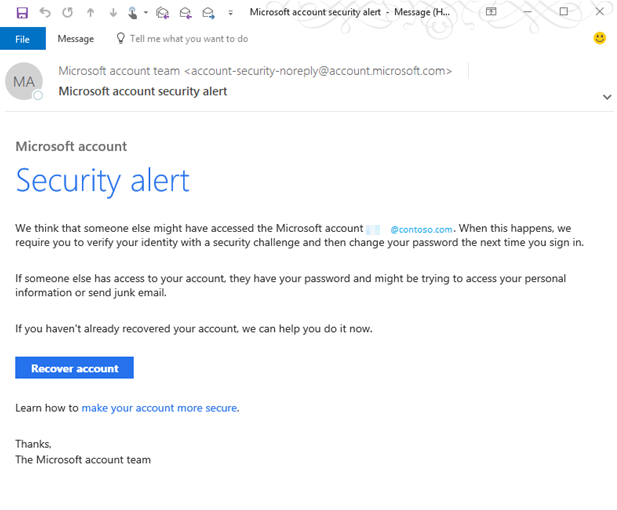
The message contains a button:
Verify Account
The design looks professional.
The logo looks correct.
The grammar is excellent.
Why could it still be phishing?
Because appearance isn’t enough.
Before clicking, check:
- Who actually sent the email?
- Where does the button lead?
- Does your Microsoft account show a security alert?
- Can you access Microsoft 365 normally?
- Can you independently navigate to Microsoft’s website?
Safer response
Open Microsoft 365 directly using your normal method rather than using the email link.
Example 2: Fake Delivery Notification
You receive:
Subject: Delivery Problem — Action Required
We were unable to deliver your package because the delivery address requires confirmation.
The message asks you to pay a small fee.
For example:
“Please pay $2.99 to reschedule delivery.”
This type of message can be effective because the amount is small.
People may think:
“It’s only $2.99.”
But the goal may be to collect your card information.
Warning signs
- You weren’t expecting a package.
- The delivery company isn’t one you normally use.
- The link leads to an unfamiliar domain.
- The payment request is unexpected.
- The message creates urgency.
Safer approach
Check your order through the retailer’s official website or app.
Example 3: Fake Boss Request
Imagine your manager sends:
“I’m currently with a client and need you to purchase several gift cards for an event. Please send me the codes as soon as possible.”
The message uses your manager’s name and sounds professional.
What should you do?
Don’t immediately comply.
Contact your manager through another channel.
For example:
“Did you just send me a request to purchase gift cards?”
If they say no, you’ve identified the scam.
Example 4: Fake Bank Login
You receive:
“We detected suspicious activity on your bank account. Please confirm your identity within 30 minutes.”
The link opens a page that looks like your bank.
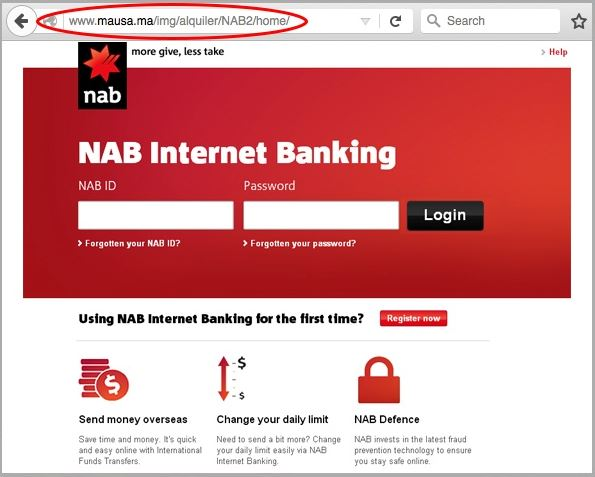
It asks for:
- Username
- Password
- Card number
- Security code
- One-time verification code
This is a major warning sign.
What to do
Don’t enter anything.
Close the page.
Open your bank’s official app or manually navigate to its known website.
If necessary, contact the bank through the official number printed on your card or listed on its official website.
Example 5: AI Voice Phishing
AI isn’t limited to text. Voice-cloning technology can make scam calls more convincing. You could receive a call that appears to come from:
- A family member
- Your manager
- A business partner
- A customer
- A company representative
The caller might claim there is an emergency.
How to protect yourself
Don’t rely solely on someone’s voice as authentication. If a caller requests money or sensitive information, verify their identity through another channel. For example, call the person back using a number you already trust.
Example 6: Fake AI Customer Support
Imagine searching for help with a technology product and encountering a fake support account. The account might say:
“We’ve detected a problem with your account. Contact our support team through this link.”
The attacker then asks for:
- Your password
- Remote access
- Payment information
- Authentication codes
Prevention
Use the company’s official support page rather than relying on unsolicited support messages from social media.
How to Verify a Suspicious Message
When something feels wrong, use an independent verification process.
Step 1: Stop
Don’t click.
Don’t reply.
Don’t download attachments.
Don’t provide information.
Step 2: Examine the sender
Look at the complete sender address or account.
Ask:
Is this actually the organization or person I expect?
Step 3: Check the destination
Hover over links when possible.
Look carefully at the domain.
Don’t assume a familiar logo means a familiar website.
Step 4: Verify independently
Go directly to the organization’s official website or app.
Don’t use contact information supplied by the suspicious message.
Step 5: Contact the organization
If you’re still uncertain, contact the company through an official channel.
For a bank, use the phone number on your card.
For a workplace request, contact the person through your normal internal communication system.
Step 6: Report the message
Depending on the situation, you may be able to report phishing through:
- Your email provider
- Your organization’s IT/security team
- The impersonated company
- Your bank
- Your local cybercrime reporting authority
Reporting helps organizations identify ongoing campaigns.
How Businesses Can Prevent AI-Generated Phishing
Businesses need more than employee awareness.
1. Use Multi-Factor Authentication
MFA adds another layer of protection if a password is stolen. Where possible, organizations should consider stronger authentication methods such as phishing-resistant authentication, and they may use a third party to stop this scam.
2. Use Password Managers
Password managers can help users create and store unique passwords. They can also make suspicious domains easier to identify because a password manager may not automatically offer credentials on an unfamiliar website.
3. Train Employees With Realistic Examples
Security training shouldn’t only say:
“Don’t click phishing emails.”
Employees should learn how to recognize:
- Fake invoices
- Password-reset scams
- Executive impersonation
- Fake delivery messages
- Social-media scams
- AI-generated messages
- Voice impersonation
- Business email compromise
4. Create Payment Verification Procedures
Companies should establish clear procedures for:
- Bank-account changes
- Large payments
- Gift-card requests
- Vendor changes
- Cryptocurrency transfers
- Sensitive data requests
For example, a company could require verbal confirmation before changing a vendor’s bank details.
5. Keep Software Updated
Security updates can address vulnerabilities attackers may use after successfully phishing someone.
Keep:
- Operating systems
- Browsers
- Applications
- Security software
- Mobile devices
updated.
What To Do If You Already Clicked a Phishing Link
Don’t panic. Your next step matters.
If you clicked but entered nothing
Close the website. Don’t download anything. Run appropriate security checks on your device. If the link was opened on a company device, notify your IT/security team.
If you entered your password
Change the password immediately from the organization website. If you reused that password elsewhere, change it there too. Make the habit of enabling MFA if it isn’t already enabled.
If you entered banking information
Contact your bank through an official channel as soon as possible. Monitor your account for suspicious transactions or seek help from the bank’s technical team.
If you provided an authentication code
Treat it as a serious security layer. Change the relevant credentials and contact the service provider through an official channel.
If you downloaded or installed something
Disconnect the affected device from networks if appropriate and contact your organization’s IT/security team or a qualified security professional. Don’t assume that deleting the downloaded file completely resolves the problem.
AI Tools Can Also Help Defend Against Phishing
AI isn’t only useful to attackers. Modern security systems can use machine learning and other automated techniques to identify suspicious behavior.
Email security systems may analyze:
- Sender reputation
- Message content
- Links
- Attachments
- Domain information
- Communication patterns
- Authentication signals
However, users should not assume that an email security system will catch everything and that they can relax. Human verification is still an important part.
Can AI Detectors Identify AI-Generated Phishing?
Not reliably enough to make them your primary defense. A phishing message might be:
- Entirely written by AI
- Written by a human
- AI-generated and then edited
- Translated by AI
- Based on an old phishing template
- Generated from a combination of tools
Trying to determine whether text was written by AI is therefore less useful than determining whether the request itself is trustworthy.
Instead of asking:
“Was this written by AI?”
ask:
“Is this request legitimate, and how can I independently verify it?”
That’s a much more useful security question.
A Simple 10-Second Phishing Check
When you receive an unexpected message, ask these questions:
1. Was I expecting this?
If not, slow down.
2. Is there urgency?
Pressure is a common phishing technique.
3. Is money involved?
Treat unexpected financial requests carefully.
4. Is sensitive information requested?
Never casually provide passwords or authentication codes.
5. Where does the link go?
Check the actual destination.
6. Who really sent it?
Examine the complete address or account.
7. Is this normal behavior?
Compare it with the person’s or organization’s usual communication.
8. Can I verify it independently?
If yes, do that before acting.
AI-Generated Phishing vs Traditional Phishing
| Feature | Traditional Phishing | AI-Generated Phishing |
|---|---|---|
| Grammar | Often poor | Can be highly polished |
| Personalization | Often limited | Can be highly personalized |
| Languages | More limited | Can support many languages |
| Message style | Often generic | Can imitate different styles |
| Fake conversations | Less sophisticated | Can be automated |
| Voice scams | Less common | AI voice cloning can increase realism |
| Main objective | Steal information or money | Same objective |
| Best defense | Verification | Verification |
The important point is that AI changes how phishing can look, but it does not change the fundamental strategy to protect against scams: verify before you trust.
Final Thoughts
AI-generated phishing scams are becoming harder to recognize because attackers are becoming smarter and can produce professional-looking messages to attract the victim. That means older rules such as:
“Phishing emails always contain spelling mistakes.”
are no longer sufficient.
Instead, focus on behavior and context. Be especially cautious when a message:
- Creates unusual urgency
- Requests money
- Requests passwords or verification codes
- Contains an unexpected attachment
- Sends you to a new login page
- Comes from an unusual account
- Requests a change to payment information
- Discourages independent verification
Most importantly, don’t let attractive writing create false trust. An AI-generated phishing email can look professional. A fake support agent can sound friendly. A cloned voice can sound familiar. A fake website can look almost identical to the real one.
The safest habit is simple:
Stop. Verify independently. Then act.
When something involves your money, identity, passwords, or security, taking an extra minute to verify the request can prevent a much bigger problem later.
Stay Ahead with ControlOwl
Get the latest AI tools, software tips, tutorials, and technology insights delivered straight to your inbox.