Artificial intelligence assistants are becoming important tools for everyday work. They can help with writing emails, summarizing documents, brainstorming ideas, researching unfamiliar topics, analyzing information, and organizing schedules.
Two of the most popular options are ChatGPT and Google Gemini. Both can perform many similar tasks, but they differ in the way they approach particular requests. So, when comparing ChatGPT vs. Gemini, which one should you choose for work?
The answer depends on what you want to do. A freelance writer may prioritize writing and editing. A researcher may care more about finding reliable sources and citations. A business owner may want help with customer emails, reports, planning, and marketing.
Someone who works in Google Docs and Gmail every day may value integration with those applications more than anything else.
Instead of choosing an AI assistant based on popularity, this guide examines four practical areas: writing, reasoning, research, and everyday productivity. It also provides a repeatable test you can run with both assistants to compare their actual outputs.
Quick comparison: ChatGPT vs Gemini
| Feature | ChatGPT | Google Gemini |
|---|---|---|
| Writing and editing | Drafting, rewriting, brainstorming, and adapting tone | Drafting, summarizing, brainstorming, and refining content |
| Reasoning | Can work through complex questions and structured problems | Can analyze complex questions and support problem-solving |
| Web research | Search and deeper research tools, depending on plan | Search and Deep Research tools, depending on plan |
| Workplace integration | Projects, file workflows, and supported connected apps | Particularly useful with supported Google Workspace apps |
| Document analysis | Can analyze supported uploaded files | Can work with supported files and connected Google sources |
| Best starting point | People wanting a flexible general-purpose assistant | People whose work is closely connected to Google’s ecosystem |
These are general differences, not test scores. Specific features, usage limits, and integrations depend on the account, subscription, region, and rollout. OpenAI documents ChatGPT’s search, file analysis, data analysis, and project capabilities; Google documents Gemini’s Workspace integrations and research features.
1. What is ChatGPT?
ChatGPT is an AI assistant developed by OpenAI. It can respond to questions, generate and revise text, explain concepts, analyze uploaded documents, work with data, and assist with creative and technical tasks.
Its additional tools can support research, file-based workflows, image tasks, and ongoing projects, depending on the plan and features available to the user.
ChatGPT can be helpful for tasks such as:
- Writing client proposals and business emails.
- Creating blog outlines and first drafts.
- Explaining technical concepts in plain language.
- Reviewing code and troubleshooting errors.
- Summarizing reports and extracting key information.
- Brainstorming marketing campaigns and business ideas.
- Turning rough notes into structured documents.
One important feature is the ability to refine a response through follow-up commands. You can request a shorter version, change the tone, add examples, or reorganize the content without starting from scratch.
However, ChatGPT is not automatically accurate. It can misunderstand instructions, produce incorrect facts, or generate convincing explanations that require verification. Its usefulness depends on the task, the model selected, the quality of the instructions, and how carefully you review its output.
2. What is Google Gemini?
Google Gemini is Google’s AI assistant. It helps users write, summarize, brainstorm, answer questions, analyze information, and work with different types of content.
One of its important advantages for eligible users is its connection to Google’s productivity ecosystem, including supported workflows across Gmail, Docs, Drive, Sheets, and Slides. Available capabilities depend on the account and plan.
Gemini can be useful for tasks such as:
- Drafting or improving emails.
- Summarizing documents and notes.
- Creating outlines for presentations.
- Analyzing information from supported files.
- Researching subjects using available research tools.
- Organizing information within Google-based workflows.
- Generating ideas for projects and campaigns.
For someone who already uses Google Workspace, having AI assistance close to their existing documents and communications can reduce the need to switch between applications.
But integration alone does not guarantee better results. You still need to evaluate whether Gemini follows your instructions, uses reliable information, and produces work that is ready for practical use.
3. ChatGPT vs Gemini: How we should test them
An honest comparison requires more than asking each assistant which one is better. It also requires more than looking at feature lists from the website.
The best approach is to give both assistants the same task, compare their responses using the same criteria, and document the conditions of the experiment. For this article, the testing framework covers four everyday work scenarios:
Test 1: Writing
Can the assistant write a professional email that is clear, concise, natural, and appropriate for the audience?
Test 2: Reasoning
Can it solve a business problem while respecting constraints and explaining its recommendations?
Test 3: Research
Can it provide relevant, verifiable sources and distinguish evidence from assumptions?
Test 4: Everyday productivity
Can it turn a collection of tasks into a realistic, organized work plan?
Testing date: October 10, 2026 is the date of this article’s comparison framework. It is not, by itself, evidence that both assistants were tested on that date.
The prompts and scoring below are ready to use. The actual performance scores must be added after collecting and reviewing both assistants’ responses.
Conditions for a fair comparison
For a useful experiment:
- Record the date, model name, subscription tier, and enabled tools for each assistant.
- Start a fresh conversation for each test.
- Submit exactly the same prompt to both assistants.
- Use the same research settings and comparable browsing access when testing research.
- Save both responses without editing them.
- Score the original responses using the same rubric.
- Record factual errors, missing requirements, and the amount of editing needed.
This matters because AI products change frequently. Results from one model, plan, or date should not be treated as a permanent ranking of the entire product.
4. Test 1 — Writing quality
Writing is one of the basic reasons people use an AI assistant at work. A best writing assistant should understand the audience, follow the requested tone, avoid unnecessary repetition, and produce text that needs minimal editing.
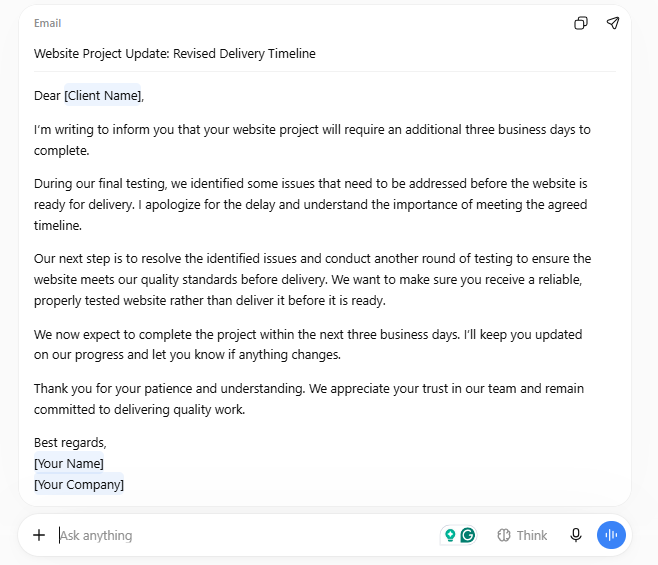
The identical prompt
Write a professional email to a client explaining that their website project will be delayed by three business days because additional testing revealed problems that need fixing. Apologize without making excuses, explain the next step, and maintain the client’s confidence. Keep the email under 150 words. Do not invent details about the problem.
What should you evaluate?
Look at both responses side by side. Ask these questions:
- Does the email sound natural and professional?
- Does it explain the delay without sounding defensive?
- Does it include a clear next step?
- Does it avoid inventing technical details or promises?
- Is it concise enough to send with minimal editing?
A response that uses polished language but invents a reason for the delay should not receive a high accuracy score. A simpler email that follows every instruction may be more useful.
Writing test scorecard
| Criterion | Points |
|---|---|
| Clarity and readability | 0–5 |
| Tone and professionalism | 0–5 |
| Follows all instructions | 0–5 |
| Accuracy and avoids invented details | 0–5 |
| Total | 20 |
Record the two scores after reading the actual outputs. Do not award points simply because one response is longer or sounds more sophisticated.

5. Test 2 — Reasoning and problem-solving
An AI assistant should do more than write text. In a workplace, it should be able to prioritize important tasks and explain why a recommendation makes more sense than another.
The identical prompt
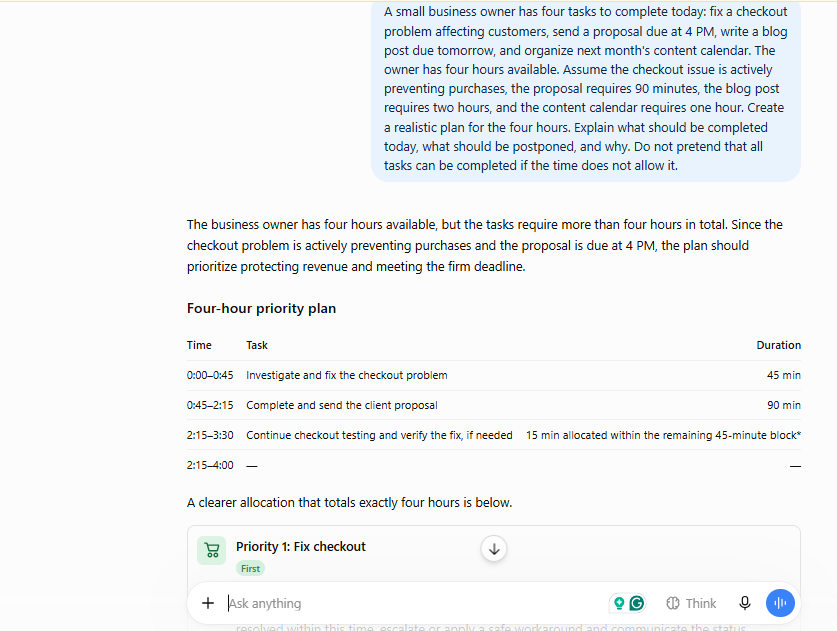
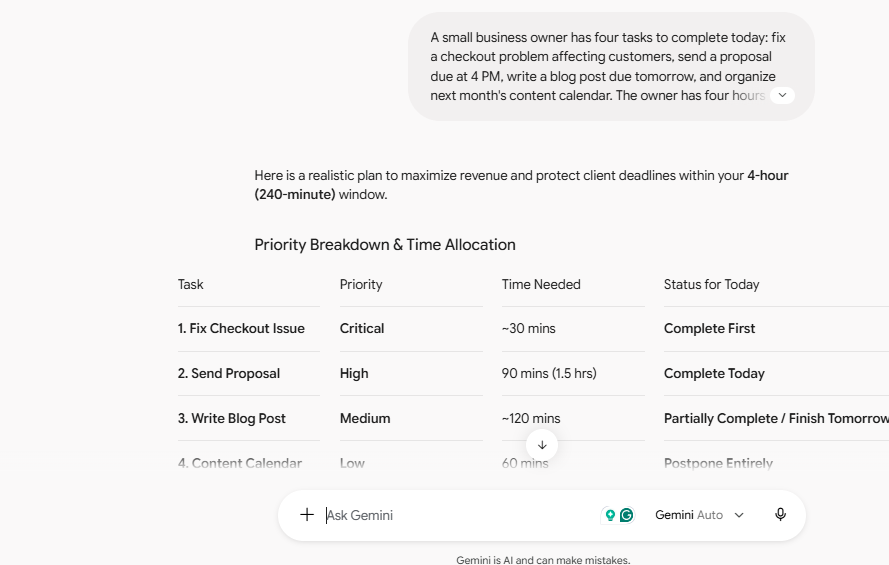
A small business owner has four tasks to complete today: fix a checkout problem affecting customers, send a proposal due at 4 PM, write a blog post due tomorrow, and organize next month’s content calendar. The owner has four hours available. Assume the checkout issue is actively preventing purchases, the proposal requires 90 minutes, the blog post requires two hours, and the content calendar requires one hour. Create a realistic plan for the four hours. Explain what should be completed today, what should be postponed, and why. Do not pretend that all tasks can be completed if the time does not allow it.
What should a strong answer recognize?
The tasks require a total of at least 4.5 hours, even before allowing time to investigate the checkout issue. Therefore, completing everything within four hours is not realistic under the stated assumptions.
A good answer should:
- Prioritize the checkout issue because it is actively preventing sales.
- Protect enough time to deliver the proposal before its deadline.
- Recognize that the blog post and content calendar cannot both be completed in full alongside the other tasks.
- Suggest a reasonable postponement or reduced scope.
- State any assumptions about the time required to resolve the checkout issue.
This is a useful test because the answer must recognize a constraint rather than simply produce a neat schedule.
Reasoning test scorecard
| Criterion | Points |
|---|---|
| Identifies the time conflict | 0–5 |
| Prioritizes urgent and important work | 0–5 |
| Produces a feasible schedule | 0–5 |
| Explains trade-offs and assumptions | 0–5 |
| Total | 20 |
A polished timetable that allocates four hours but quietly ignores the extra 30 minutes should lose points. Correctly identifying an impossible schedule is more important than making every task fit on paper.
6. Test 3 — Research and fact-checking
Research is where an AI assistant’s confidence can be mistaken. An answer can sound true while containing outdated information, unsupported claims, or links that do not substantiate the statements beside them.
ChatGPT offers web search and deeper research capabilities. Gemini also offers research tools, including Deep Research in eligible experiences. Both can produce source-backed reports, but the sources and factual claims still need to be checked.
The identical prompt
Research the current AI productivity tools available to small businesses in October 2026. Compare ChatGPT, Google Gemini, and Microsoft Copilot. Use official product documentation for feature claims and official pricing pages for prices. Provide a table covering main use cases, workplace integrations, free access if available, paid pricing with currency and billing period, and major limitations. Include direct source links, the date checked, and a short recommendation for a small business using Google Workspace. If a price or feature cannot be verified, mark it as unverified instead of guessing. Separate confirmed facts from your recommendations.
How to score the research
Do not give a high score merely because an assistant provides many links. Open a sample of its sources and check whether they support the claims being made.
| Criterion | Points |
|---|---|
| Factual accuracy | 0–5 |
| Quality and relevance of sources | 0–5 |
| Correct dates and pricing details | 0–5 |
| Clear separation of facts and recommendations | 0–5 |
| Total | 20 |
Record any broken links, unsupported claims, outdated prices, or missing limitations.
For a fair comparison, use comparable research modes and give both assistants the same research deadline and instructions. If one uses a deeper research mode and the other uses ordinary chat, record that difference instead of presenting the result as a pure model-to-model comparison.
Important: The prompt specifies October 2026 because this is a time-sensitive comparison. Pricing and feature availability should be checked on the date the test is actually performed.
7. Test 4 — Everyday productivity
The best AI assistant for work is not necessarily the one that writes the best paragraph. It may be the one that helps you get through a realistic working day with less friction.
This test examines whether an assistant can transform rough notes into a practical plan without losing important details.
The identical prompt
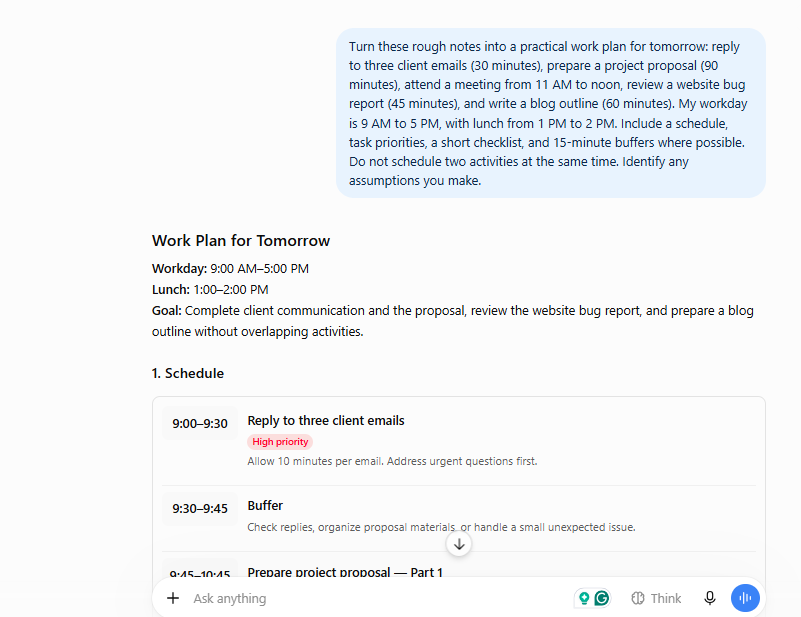
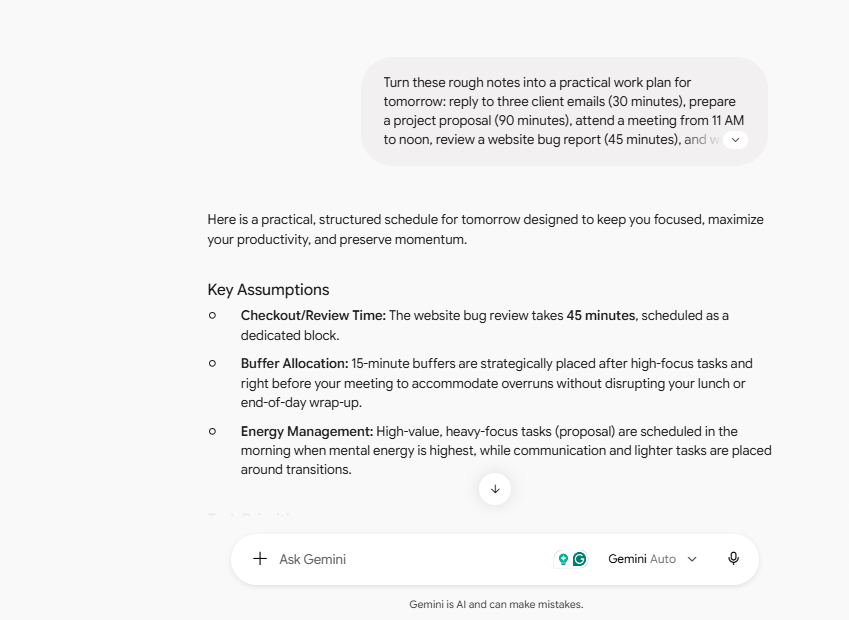
Turn these rough notes into a practical work plan for tomorrow: reply to three client emails (30 minutes), prepare a project proposal (90 minutes), attend a meeting from 11 AM to noon, review a website bug report (45 minutes), and write a blog outline (60 minutes). My workday is 9 AM to 5 PM, with lunch from 1 PM to 2 PM. Include a schedule, task priorities, a short checklist, and 15-minute buffers where possible. Do not schedule two activities at the same time. Identify any assumptions you make.
What should you look for?
A strong response should:
- Respect the fixed meeting and lunch break.
- Fit all five activities into the available workday.
- Avoid overlapping tasks.
- Place important or time-sensitive work appropriately.
- Include useful buffers without making the schedule impossible.
- Provide a checklist that matches the schedule.
This task can also reveal a difference between generating a plan and executing it. A chat response may create a useful schedule, but actually accessing calendars, sending emails, or editing documents requires the relevant integrations, permissions, and supported capabilities.
Productivity test scorecard
| Criterion | Points |
|---|---|
| Schedule feasibility | 0–5 |
| Correct handling of constraints | 0–5 |
| Prioritization and usefulness | 0–5 |
| Clarity and ease of execution | 0–5 |
| Total | 20 |
8. ChatGPT vs Gemini: Results table
Once you have responses to all four tests, use the following table to record your findings. Each category is worth 20 points, giving each assistant a maximum of 80 points.
Enter scores from the real outputs. This calculator does not perform the tests or verify the answers for you.
| Test | ChatGPT / 20 | Gemini / 20 |
| Writing | 17 | 15 |
| Reasoning | 18 | 17 |
| Research | 15 | 18 |
| Productivity | 17 | 17 |
The total score will appear when all eight fields contain valid scores from 0 to 20.
How to interpret the results
Do not focus only on the total score. Look at which tasks matter most to your actual work.
For example, a freelancer who spends most of the day writing may care more about the writing and research scores. A manager who works in shared documents and email may value productivity and integrations. A developer may need additional coding tests before making a decision.
A difference of one or two points in a subjective test should not automatically be treated as proof that one assistant is superior. Review the original responses and repeat tests when results are close.
9. Google Gemini vs ChatGPT: Which is better for different jobs?
The results of your own tests should make your choice, but your workflow matters too. Here is how I would choose between the two for common tasks.
For writers and content creators
Try both for outlines, first drafts, editing, and rewriting. ChatGPT is worth considering if you want a flexible conversational writing workflow. Gemini is worth testing if you create and maintain content in Google Docs. Judge the final text, factual accuracy, and editing time—not the number of words produced.
Compare how well each assistant turns rough ideas into proposals, reports, plans, and customer communications. ChatGPT offers a broad set of file and data-analysis capabilities, while eligible Gemini and Workspace workflows can connect assistance directly to business documents and communications.
For researchers and analysts
Test the research modes of both products. Compare source quality, citation accuracy, coverage, and whether the report answers the actual question. An assistant that provides fewer but more relevant, verifiable sources may be more useful than one that generates a longer report.
For everyday office productivity
If your work already happens in Gmail, Google Docs, Drive, and Sheets, Gemini’s supported Workspace integrations are an important consideration. If you prefer a separate assistant for varied tasks, document analysis, and ongoing projects, explore ChatGPT’s tools and connected workflows. Check which capabilities your account actually includes.
10. Pricing: Is ChatGPT or Gemini better value?
Price matters when choosing the best AI tools for work, especially for freelancers, students, and small businesses.
However, comparing subscription prices alone can be unfair. A plan might include higher usage limits or integrations that reduce the need for other tools, while another may provide sufficient functionality through free access. Before subscribing, check the current official pricing and plan details:
Compare the following factors:
| Factor | Why it matters |
|---|---|
| Free access | Useful for trying everyday tasks before paying |
| Usage limits | Important if you rely on AI throughout the workday |
| Advanced models | May matter for complex reasoning or research |
| File and research tools | Can affect the quality of your workflow |
| Workplace integrations | May reduce manual copying between applications |
| Regional availability | Pricing, billing, and features can vary by country |
For businesses, also check workspace administration, data protection terms, and whether features require an individual AI subscription or an eligible business plan.
My recommendation: Start by testing the free access available to you. Upgrade only when you can identify a specific limitation that affects your work and a paid plan demonstrably solves it. Verify current prices and billing terms before publishing a numerical price comparison.
11. Final verdict: Which AI assistant is better for work?
The comparison between ChatGPT and Gemini does not have to produce one final winner. Choose ChatGPT if its tested responses fit your writing style, problem-solving needs, research workflow, and preferred way of working with files. Its broad set of conversational and analytical tools makes it worth evaluating for a wide range of professional tasks.
Choose Google Gemini if it performs well on your tasks and its available integrations with Google Workspace make your daily work easier. That advantage can be especially relevant when your business depends on Gmail, Docs, Drive, Sheets, and Slides.
If you are unsure, test both before paying. Use the same prompts, record the models and settings, evaluate their actual outputs, and compare the time required to produce work you are comfortable using.
The best AI assistant for work is the one that consistently helps you complete your real tasks accurately, efficiently, and with less effort.
One final note about this review: the prompts and scoring framework in this article are reproducible, but no hands-on performance scores have been established here. Complete the four tests and add your actual results before presenting this as a tested winner comparison.
Stay Ahead with ControlOwl
Get the latest AI tools, software tips, tutorials, and technology insights delivered straight to your inbox.