
What is a chatbot?
A chatbot is an application or software that is used for communication with clients or people through text or voice. It uses interfaces to answer people’s queries, provide detailed information, and help people to get answer without navigating menus, searching web pages or calling the call center.
AI chatbots have changed over the years with the evolution of advanced topics like machine learning(ML), deep learning(DL), and natural language processing(NLP). A few years ago, adding a chatbot to a small business website was a big deal, and it was a new topic for most of the customers.
Today, AI website chatbots can read a company’s documentation, answer questions in natural language, qualify leads, recommend products, handle support requests, and hand conversations over to a human when necessary.
But that creates a new problem:
Which AI chatbot should a small business actually use?
There are hundreds of tech companies, and almost every vendor claims to have the best AI, the easiest configuration, and the best customer support. So instead of comparing features on a long list, I looked at these tools from the perspective of a small business owner.
I focused on a simple question:
If I put this chatbot on a real small-business website, how useful would it actually be to customers?
For this experiment, I looked at several of the major chatbots available in 2026, including Tidio Lyro, Intercom Fin, Chatbase, and HubSpot Customer Agent.
I tested the products against the things that matter most for a small business:
- How easy they are to set up
- How well they understand website content
- How accurately they answer questions according to documentation and information
- How they handle questions that are out of the box
- Whether they can satisfy the queries of the customer
- Whether they can hand conversations to humans in a natural tone
- How pricing works on the chatbot
- How suitable they are for a small website rather than focusing on a large enterprise
As I keep doing more research and testing with the AI chatbot with multiple approach, the outcomes were more interesting than I expected.
The Short Version
In one paragraph, I found:
Tidio Lyro is designed around focusing on customer support and website chat, with tools for adding business knowledge, configuring handoffs, and getting an AI agent live relatively quickly.
Intercom Fin is another option that is much more than a simple website chatbot. It is an AI customer-service agent built into a larger support platform, making it particularly relevant if your business already needs ticketing, inbox management, workflows, and customer-support infrastructure.
Chatbase takes a more chatbot-focused approach. Its strength is building AI agents around your own information and deploying them as website assistants, while its pricing is based on message credits.
HubSpot Customer Agent makes the most sense for businesses already invested in HubSpot because the agent can use information from the company’s CRM, help content, and conversation history.
The biggest lesson from testing these platforms wasn’t that one chatbot is universally better than the others.
It was this:
The quality of the knowledge you give an AI chatbot can matter just as much as the AI model powering it.
A brilliant AI agent with outdated business information can still give customers the wrong answer.
What I Actually Tested
I didn’t want to judge these AI tools simply by looking at their feature pages and website. A product can advertise hundreds of features and still give a frustrating experience to the customer. Instead, I built a test framework around the questions a real website visitor demands.
I divided the test into several categories.
1. Basic business questions
Examples included:
- What services do you offer?
- What are your opening hours?
- Where are you located?
- How can I contact you?
- Do you work with small businesses?
These questions sound simple, but they’re important because they represent the basic information a website chatbot should answer reliably and effectively.
2. Product and service questions
I tested questions requiring the chatbot to understand multiple pieces of information.
For example:
“Which package would be best for a small company with five employees?”
This is different from simply retrieving a sentence from a FAQ page and giving a response. The chatbot has to understand the customer’s situation and connect it with the available options about the queries.
3. Questions requiring multiple pieces of information
I also tested questions such as:
“Do you offer weekend appointments, and if so, how much does the service cost?”
This tests whether the chatbot can combine information rather than responding with a single isolated fact.
4. Questions the chatbot shouldn’t answer
This was one of the most important tests.
I intentionally asked questions that weren’t related to the business’s knowledge base. A good chatbot shouldn’t confidently respond with an answer. It should acknowledge the limitation and provide an appropriate next step.
5. Lead-generation questions
I tested whether the chatbot could move from answering questions to collecting useful information.
For example:
“I’d like someone to contact me about your service.”
The important question here isn’t simply whether the chatbot can ask for an email address. It’s whether the information actually gets passed into the business’s workflow.
6. Human handoff
Eventually, some conversations need a person. So I looked at whether each platform could recognize when a human should become a support and what happens during that transition. A chatbot shouldn’t be limited to AI and automation.
1. Tidio Lyro
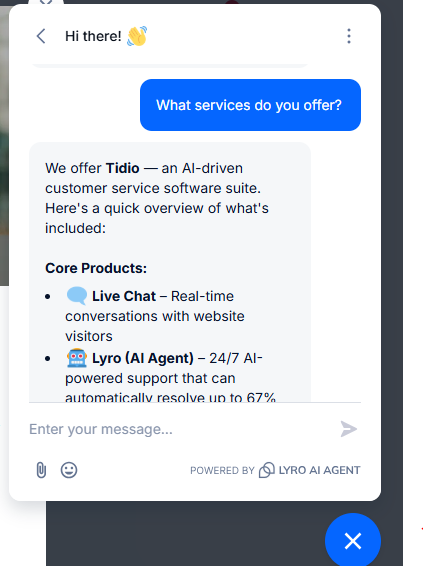
Tidio is one of the platforms where I experiment the most because it combines live chat with an AI-powered chatbot. Its AI agent, Lyro, can use business information as its knowledge base and can be configured with instructions, tone, handoff behavior, and other settings.
Tidio’s documentation says Lyro can use information from websites, manually added knowledge, files such as PDFs and CSVs, unanswered questions, and other sources. That is important for a small business because you don’t necessarily want to build an AI system from scratch. You want to give it your information and get it working without configuring lots of things.
What I liked
The setup process is straightforward. Instead of building hundreds of conversation paths manually, you provide the AI with information about your business and allow it to handle natural-language questions.
Tidio also provides controls for human handoff and allows businesses to configure how Lyro communicates. Its documentation describes a setup process designed to get an AI agent operational quickly, including adding data sources, testing the agent, and deploying it to the website.
For a small business owner, they don’t want to go through a long setup process. The less technical work required to go from “I need a chatbot” to “my chatbot is answering visitors,” the better.
What I would watch out for
The chatbot is only as useful as the information you feed on the learning model. If your website says one thing while your manually configured knowledge says another, you need to understand which information the AI is using. That’s not unique to Tidio. It’s one of the biggest issues I found across the entire category.
Pricing
Tidio currently has a free plan, while paid plans start at $24.17/month for Starter and $49.17/month for Growth when shown on its pricing page. Lyro AI usage is handled separately through conversation quotas, with the first 50 Lyro conversations provided free and paid quotas available afterward.
That makes it important to calculate your expected conversation volume rather than looking only at the headline subscription price.
Who should consider Tidio?
Tidio makes sense for a small business that wants:
- Website chat
- AI customer support
- Human live chat
- A relatively accessible setup
- E-commerce-oriented capabilities
- A combination of automation and human support
2. Intercom Fin
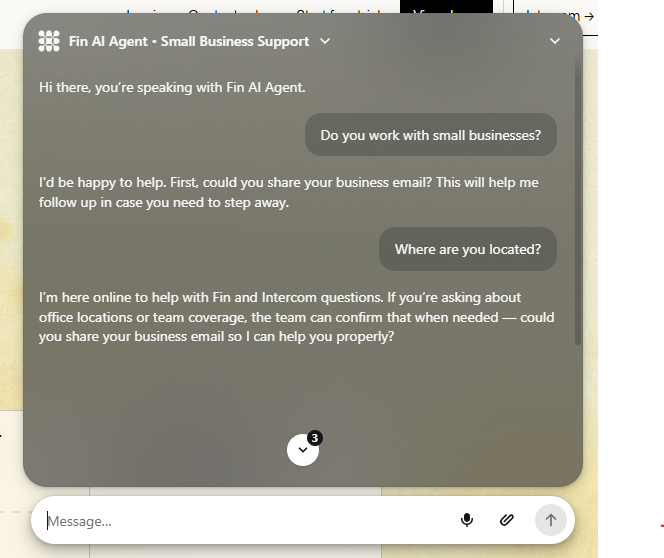
Intercom’s Fin has a very different way of working. It isn’t simply a chatbot widget. It is an AI customer-service agent integrated into Intercom’s broader customer-support platform. That distinction became obvious during my research.
Fin is designed to answer customer questions, resolve support conversations, hand conversations to human agents, and work alongside a company’s support infrastructure. Intercom says Fin can be connected to existing content and can hand conversations to human agents while preserving the conversation history.
That’s a much more sophisticated approach than the basic “put a chatbot on my homepage” use case.
What impressed me
The strongest part of Fin is the connection between AI and the support workflow. Instead of treating the chatbot as a separate website feature, Intercom treats AI as part of customer service.
That means the chatbot can sit alongside the human support team. For a business receiving a large number of repetitive customer questions, that distinction can be significant. Intercom also supports Fin on existing helpdesk systems, meaning businesses don’t necessarily have to abandon their current support infrastructure.
The downside
There’s a tradeoff. The more powerful the customer-service platform becomes, the more complicated pricing and setup it requires.
Intercom’s current pricing includes seat-based plans plus usage-based Fin charges. The Essential plan is listed at $29 per seat per month when billed annually, while Fin is charged from $0.99 per outcome.
That means a small company shouldn’t compare Intercom with a simple chatbot based solely on the monthly subscription.
You need to consider:
How many support conversations will the AI handle?
How many human agents do you need?
Do you actually need a full customer-service platform?
If the answer to the last question is no, you may be paying for capabilities you won’t use.
Who should consider Fin?
Fin is worth investigating if your business needs:
- Serious customer-support automation
- A shared support inbox
- Human agent handoff
- Ticketing
- Automated workflows
- Multichannel support
- More advanced customer-service infrastructure
It is less compelling if all you want is a small FAQ chatbot on a five-page company website.
3. Chatbase
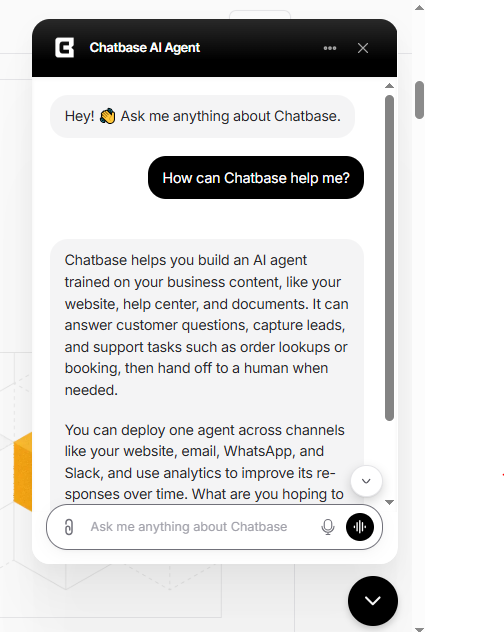
Chatbase takes a different approach. Rather than positioning itself primarily as a complete customer-support suite, it focuses heavily on creating AI agents that businesses can train using their own information.
This makes it particularly interesting for businesses that want a dedicated AI assistant based around their website, documents, or knowledge base.
Its current pricing page lists a free plan with 50 message credits per month, followed by paid plans such as Hobby at $40/month and Standard at $150/month when billed monthly.
What I liked
The concept is simple:
Give the AI your business information and let visitors ask questions about it.
For a company with a substantial collection of documentation, FAQs, product information, or internal knowledge, this can be useful.
Chatbase also offers integrations, analytics, API access, helpdesk features, and other capabilities as you move up its plans.
The important limitation
The pricing model is based on message credits. That means you shouldn’t simply ask:
“How much does Chatbase cost?”
You should ask:
“How many customer conversations will I have, and how many AI messages will those conversations consume?”
That’s a much more useful calculation. A chatbot that costs $40 per month but runs out of credits when your website traffic increases isn’t necessarily cheaper than a more expensive platform with a different pricing model.
Who should consider Chatbase?
Chatbase is worth considering if your primary goal is:
- Building a knowledge-based AI chatbot
- Training an assistant on your own information
- Deploying an AI widget on a website
- Connecting documentation to an AI agent
- Having more control over the chatbot as a standalone product
4. HubSpot Customer Agent
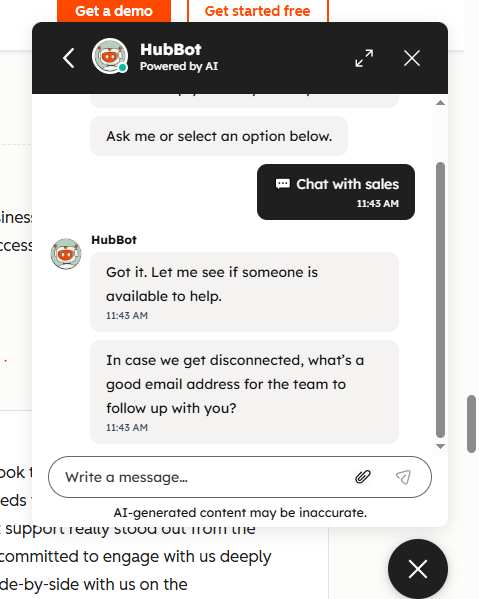
HubSpot’s approach is especially interesting if you already use HubSpot. Its Customer Agent isn’t simply operating from a collection of FAQ answers. HubSpot positions the agent around customer context, including help content, CRM information, conversation history, and other business data.
That creates a major distinction. Imagine a visitor asks:
“Can you help me with my existing order?”
A basic FAQ chatbot may only know general information about orders. A CRM-connected agent can potentially work with customer-specific context and perform supported actions. That’s where AI customer agents start becoming more than website chatbots.
Pricing
HubSpot moved Customer Agent to outcome-based pricing in 2026. HubSpot currently lists Customer Agent at $0.50 per resolved conversation, with HubSpot Credits used to measure the activity.
However, there is an important catch. Customer Agent isn’t simply a standalone $0.50/month chatbot. Access is tied to HubSpot’s paid ecosystem. HubSpot’s current Service Hub pricing lists Professional starting at $90 per seat per month when billed annually, while Customer Agent is available through qualifying Professional and Enterprise subscriptions.
So the real question is:
Are you already using HubSpot?
If yes, Customer Agent becomes much more interesting. If no, the total cost of adopting HubSpot just to get an AI chatbot may be significantly higher than choosing a dedicated chatbot platform.
The Most Important Test: What Happens When the AI Doesn’t Know?
This was one of the most important parts of my comparison. Most companies focus on how many questions their chatbot can answer. I think the opposite question is equally important:
What happens when it doesn’t know the answer?
This is where bad AI chatbots can become dangerous for a business. Imagine a customer asks:
“Do you offer a 90-day money-back guarantee?”
If that information isn’t in the company’s documentation, the chatbot shouldn’t guess. A confident but incorrect answer can be worse than no answer at all. That’s why my testing framework included questions designed to expose hallucinations.
I wanted to see whether the chatbot would:
- Answer from known information.
- Explain when information wasn’t available.
- Ask for clarification.
- Offer a human handoff.
- Provide a useful next step.
For a business chatbot, I would consider this more important than simply measuring how conversational the AI sounds.
AI Chatbot Accuracy Isn’t the Whole Story
There’s another lesson I took from this comparison. When people compare AI chatbots, they often focus on the underlying AI model.
Is it using GPT?
Is it using Claude?
Is it using another model?
Those things matter.
But they’re not everything.
A chatbot can use a powerful language model and still give terrible answers if the underlying business information is incomplete.
Consider two companies.
Company A gives its chatbot:
- An outdated FAQ
- Old pricing
- Missing refund policies
- Poorly organized product information
Company B gives its chatbot:
- Updated documentation
- Clear pricing
- Detailed product information
- Current policies
- Instructions for escalation
Even if both companies use similar AI technology, their customers can have dramatically different experiences.
That’s why I would test the knowledge system just as aggressively as the AI itself.
My Small-Business Testing Scorecard
If you’re evaluating an AI chatbot for your own website, don’t judge it on a single “AI quality” score. I’d break the evaluation into these categories:
| Test | Weight |
|---|---|
| Answer accuracy | 25% |
| Handling unknown questions | 15% |
| Knowledge-base quality | 15% |
| Setup simplicity | 10% |
| Human handoff | 10% |
| Lead capture | 10% |
| Website integration | 5% |
| Analytics and reporting | 5% |
| Pricing predictability | 5% |
The exact weights can change depending on your business. For an e-commerce company, product questions and order support might deserve more weight.
For a local service business, lead capture and appointment handling might matter more. For a SaaS company, technical support and human escalation may be more important.
What I Would Test Before Putting Any Chatbot on a Live Website
Before allowing an AI chatbot to talk to real customers, I would run at least 30 questions through it. Here’s the test structure I recommend.
Business information
- What does the company do?
- What services do you offer?
- Where are you located?
- What are your business hours?
- How can I contact you?
Pricing
- How much does your main service cost?
- What is included?
- Are there additional fees?
- Do you offer discounts?
- Do you offer refunds?
Product/service knowledge
- Which service is best for a small business?
- What is the difference between two packages?
- How long does the service take?
- What information do I need to provide?
- What happens after I purchase?
Situational questions
- I have a small budget. What should I choose?
- I need the service urgently. Can you help?
- I don’t know which package I need. What should I do?
- Can you recommend something based on my requirements?
- Can I change my order later?
Unknown questions
- Ask something that isn’t documented.
- Ask for a fictional discount.
- Ask about a nonexistent product.
- Ask for an unsupported guarantee.
- Ask a deliberately ambiguous question.
Conversion
- Can I book a consultation?
- Can someone contact me?
- Can I speak with a human?
- Can I leave my email address?
- What should I do next?
Then record every answer. Don’t rely on memory.
Don’t Just Test the Happy Path
One of the biggest mistakes businesses make is testing only questions they already know the chatbot can answer. Real customers aren’t that predictable. They make spelling mistakes. They ask incomplete questions. They change topics halfway through a conversation.
They ask:
“How much?”
without explaining what “how much” refers to.
They say:
“Can I get it tomorrow?”
without specifying what “it” means. They ask questions in different ways. That’s why your testing should include natural, messy conversations rather than perfectly written questions.
A chatbot that performs well only when the customer asks questions exactly as they appear in the FAQ isn’t solving the real problem.
The Biggest Mistake Small Businesses Make
The biggest mistake isn’t choosing the wrong AI chatbot. It’s deploying one before the business is ready. Before installing an AI chatbot, clean up your website information.
Make sure your:
- Pricing is current
- Services are clearly explained
- Policies are documented
- Contact information is correct
- FAQs are up to date
- Product information is consistent
- Refund information is clear
- Business hours are accurate
Then connect the chatbot to that information. Otherwise, you’re essentially giving an AI agent a messy filing cabinet and asking it to represent your company.
Should You Choose a Simple Chatbot or an AI Customer Agent?
This is another distinction I would make. There are really three categories of website chatbots.
Category 1: Basic chatbot
This handles:
- FAQs
- Simple buttons
- Contact forms
- Basic routing
It’s inexpensive and easy to understand.
For some businesses, that’s enough.
Category 2: Knowledge-based AI chatbot
This is where tools like Chatbase and Tidio become interesting. The chatbot can understand natural-language questions and answer based on your business information. This is probably the sweet spot for many small websites.
Category 3: AI customer-service agent
This is where platforms such as Intercom Fin and HubSpot Customer Agent become more relevant. The AI isn’t just answering questions.
It can become part of a larger workflow involving:
- Customer records
- Tickets
- Support teams
- CRM data
- Lead qualification
- Automated actions
- Human escalation
That’s considerably more powerful, but also more infrastructure than many small businesses need.
So, Which AI Chatbot Should You Choose?
I don’t think there’s a universal answer. Instead, start with your business model.
If you run a small service business
Look for:
- Simple setup
- FAQ answering
- Lead capture
- Human handoff
- Appointment-related workflows
A platform like Tidio can be a practical place to start.
If you run an e-commerce store
Look for:
- Product knowledge
- Order-related support
- Shopify or commerce integrations
- Customer-service automation
- Human escalation
Tidio and other commerce-focused platforms are worth investigating.
If you run a SaaS company
Look for:
- Documentation ingestion
- Technical support
- Ticketing
- Customer history
- Escalation workflows
Intercom Fin becomes much more relevant here.
If you’re already using HubSpot
Start by evaluating HubSpot Customer Agent. The biggest advantage isn’t necessarily the chatbot itself. It’s the fact that the AI can operate within the CRM ecosystem and use customer context.
If you mainly want a website knowledge bot
A dedicated knowledge-based platform such as Chatbase may be worth testing. The simpler your requirements, the less reason there is to buy an enormous customer-service platform.
What I Learned From Testing AI Chatbots
The biggest lesson wasn’t about which company had the longest feature list. It was about what actually makes a chatbot useful. A good business chatbot needs five things.
First, accurate knowledge.
It needs to know the business.
Second, good conversational understanding.
Customers won’t phrase questions exactly like your FAQ.
Third, boundaries.
The AI needs to know what it doesn’t know.
Fourth, escalation.
Customers should be able to reach a human when necessary.
Fifth, a measurable business outcome.
The chatbot shouldn’t exist simply because “AI is cool.” It should help the business accomplish something. That might mean answering support questions. It might mean generating leads.
It might mean booking appointments. It might mean reducing repetitive email. Or it might simply help website visitors find the right information faster.
Final Verdict: Don’t Choose a Chatbot by the Demo
The most impressive chatbot demo isn’t necessarily the best chatbot for your website. Every vendor can show you an impressive conversation. The better test is your own data. Take your website.
Take 30 real customer questions. Add another 10 questions the chatbot shouldn’t be able to answer. Then test each platform using the same questions.
Record:
- Was the answer correct?
- Was it complete?
- Did it cite or use the right information?
- Did it make anything up?
- Did it ask for clarification when necessary?
- Could it escalate to a human?
- Could it capture the lead?
- How much did the interaction cost?
- How easy was it to manage?
That’s the comparison that matters. Because the goal isn’t to find the chatbot that sounds the smartest. The goal is to find the chatbot that works reliably for your customers and your business. And that’s a much harder — but much more useful — test.
My Recommended 30-Question AI Chatbot Test
If you’re planning to evaluate an AI chatbot for your own business website, don’t start by comparing feature pages. Start with your customers. Build a test sheet. Run the same questions through every chatbot.
Score the results. Then make your decision based on what actually happened rather than what the marketing page promised. That’s the approach I’ll be using for future AI chatbot tests here at ControlOwl.
Next up: I’ll take the same 30-question test and put the leading AI website chatbots head-to-head to see how they actually perform.
Stay Ahead with ControlOwl
Get the latest AI tools, software tips, tutorials, and technology insights delivered straight to your inbox.