The Future of AI Website Creation: How Artificial Intelligence Is Changing Web Design

The future of AI website creation is changing how individuals, freelancers, startups, and businesses build websites. Tasks that once required extensive coding knowledge, design experience, and hours of manual work can now be completed faster with the help of artificial intelligence (AI).
AI website builders can generate page layouts, suggest color combinations, write website content, create images, and help developers produce code. Some tools allow beginners to describe their ideas in simple language and turn them into a working website draft.
However, AI is not replacing every part of website development. Human creativity, technical knowledge, security awareness, and strategic thinking remain important for building websites that perform well.
In this guide, we explore how AI website creation works, the benefits and limitations of AI-powered web design, the tools shaping the industry, and the skills website creators will need in the coming years.
What Is AI Website Creation?
AI website creation is the process of using artificial intelligence to assist with designing, building, writing, and improving websites.
Traditional website development often involves planning a layout, writing code, creating graphics, preparing content, and testing the finished website. AI tools can help automate or accelerate several of these steps.
For example, a small business owner might enter this prompt into an AI website builder:
“Create a modern website for a local bakery with a homepage, menu, online inquiry form, opening hours, and contact information. Use warm colors and a mobile-friendly layout.”
Depending on the tool, the AI may generate an initial design, sample text, page sections, and suggested images. The owner can then edit the content, adjust the design, and connect the website to the services they need.
AI website creation does not always mean building a complete website automatically. Some tools generate entire website drafts, while others focus on specific tasks such as writing code, creating images, or improving existing pages.
How AI Is Changing Website Development
Artificial intelligence is influencing almost every stage of the website creation process.
1. Website Creation From Text Prompts
One of the most important developments is the ability to generate website drafts from natural-language instructions.
Instead of manually choosing every section, a user can describe the purpose of a website and let an AI tool suggest an initial structure.
For example, a freelance photographer could request a portfolio website containing a gallery, biography, service packages, testimonials, and a booking form.
This approach can reduce the time required to create an initial design. However, the generated website still needs review to ensure the content, layout, links, and forms work correctly.
2. AI-Powered Web Design
AI tools can help suggest layouts, typography, color palettes, and visual elements based on a website’s purpose.
An online store may benefit from product-focused layouts and clear purchase buttons, while a technology blog may need readable article pages, category navigation, and a search feature.
AI can also help creators explore multiple design directions without manually creating every option. The future of AI website creation will likely involve more personalized design recommendations based on a website’s audience, content, and performance data.
3. Automated Website Content
Website owners need more than attractive pages. They also need useful content that answers visitors’ questions.
AI writing tools can help draft product descriptions, service pages, FAQs, blog outlines, and calls to action. They can also help rewrite complicated technical information in beginner-friendly language.
However, AI-generated content should not be published without review. Writers should verify factual claims, remove repetitive language, add original examples, and make sure the final content provides genuine value.
For websites that depend on organic search traffic, helpful and trustworthy content matters more than simply publishing large amounts of AI-written text.
4. AI-Assisted Coding
AI coding assistants can help developers write code, explain errors, generate components, and identify potential improvements.
For example, a developer building a contact form might use an AI assistant to draft the HTML structure and CSS styling. The developer can then integrate the form with the website’s backend, validate inputs, and test its behavior.
AI coding tools can make technical work more accessible, but generated code may contain errors, security weaknesses, or unnecessary complexity. Developers should understand the code they use and test it before deploying changes to a live website.
5. Personalized User Experiences
AI can help websites provide more relevant experiences by analyzing appropriate user interactions and preferences.
Examples include product recommendations, conversational support, personalized content suggestions, and search results that better match a visitor’s intent.
A learning website might recommend tutorials based on topics a visitor has explored. An online store could suggest related products based on a customer’s browsing activity.
These features should be implemented with appropriate privacy safeguards, transparent data practices, and user consent where required.
The Best AI Website Creation Tools to Explore
Different tools support different parts of the website-building process. The right choice depends on your technical skills, budget, website requirements, and desired level of control.
1. Wix AI Website Builder
Wix provides AI-assisted website-building features that help users create and customize websites through guided interactions.
It can be useful for small businesses, personal websites, service providers, and creators who prefer a managed website-building platform.
Best for: Beginners who want an integrated website-building experience.
2. Hostinger AI Website Builder
Hostinger offers AI-assisted website creation alongside hosting and website management features.
Depending on the selected plan and available features, users can generate a website draft and customize its design and content.
Best for: Individuals and small businesses looking for a website builder with hosting options.
3. Framer
Framer is a website design and publishing platform with AI-assisted features for generating and refining website layouts and content.
It is particularly relevant for landing pages, portfolios, and visually focused websites.
Best for: Designers, startups, and creators who prioritize modern visual design.
4. Webflow
Webflow combines visual website design with more detailed control over page structure, styling, and publishing. Its AI capabilities can assist with selected design and content tasks.
It can be suitable for creators who need greater design flexibility than a basic website builder offers.
Best for: Designers, agencies, and businesses that need more control over their websites.
5. Cursor
Cursor is an AI-powered code editor that helps developers understand code, generate changes, and work with existing projects.
Unlike a conventional drag-and-drop website builder, it is intended for coding workflows and is most useful when you want control over the underlying implementation.
Best for: Developers and technically confident users building custom websites.
Note: AI features, pricing, and plan limits change over time. Check each provider’s official website before choosing a tool.
A Practical Experiment: Can AI Build a Small Business Website?
Rather than choosing a winner based only on marketing claims, you can compare the three builders using the same website brief.
The test prompt
Use the following prompt in each platform, adapting it only when the platform requires a different input format.
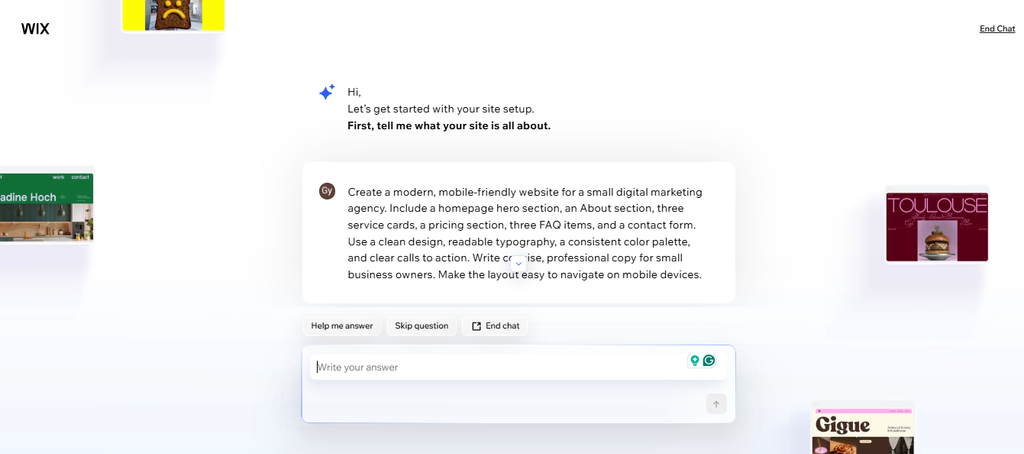
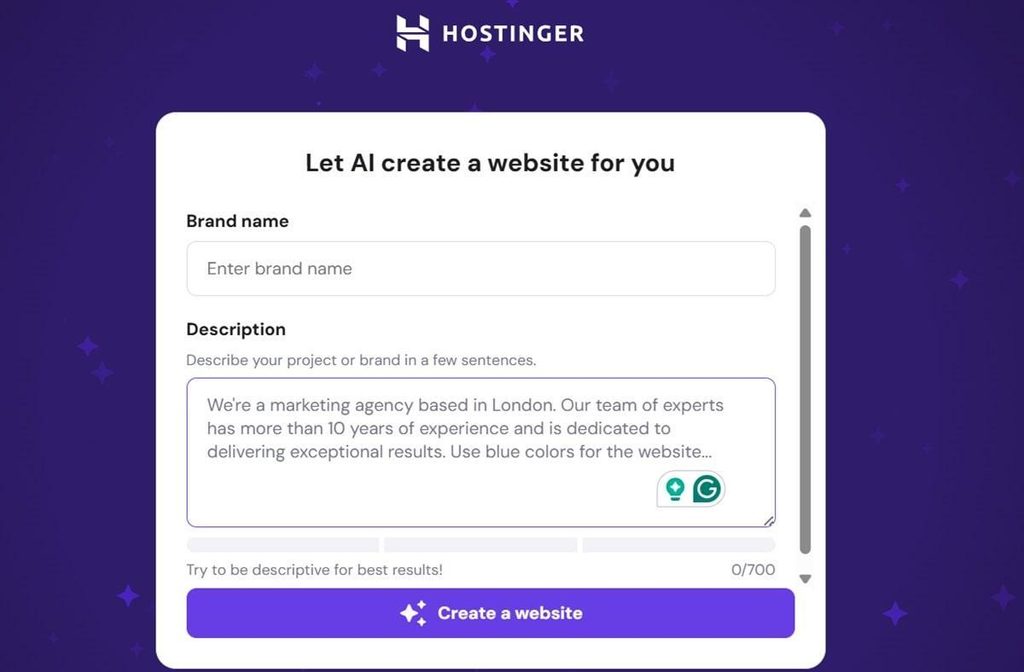
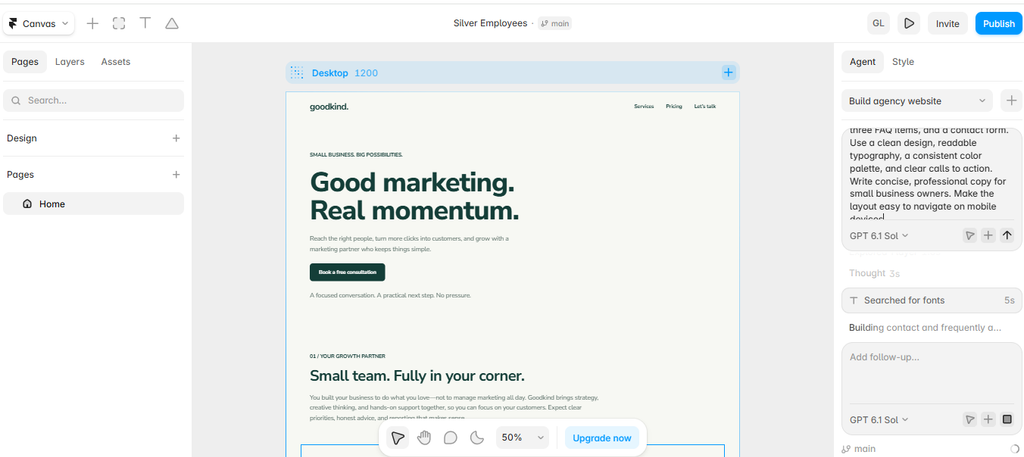
“Create a modern, mobile-friendly website for a small digital marketing agency. Include a homepage hero section, an About section, three service cards, a pricing section, three FAQ items, and a contact form. Use a clean design, readable typography, a consistent color palette, and clear calls to action. Write concise, professional copy for small business owners. Make the layout easy to navigate on mobile devices.”
Screenshot 1: Wix AI generation
Screenshot 2: Hostinger website
Screenshot 3: Framer design canvas
What to record
For each builder, document the following observations:
- Generation time: How long did it take to produce the initial draft?
- Design quality: Did the layout look coherent and professional?
- Prompt accuracy: Were all requested sections included?
- Editing effort: How many changes were needed?
- Mobile usability: Did the layout work on a phone-sized screen?
- Functionality: Did the contact form and navigation work after setup?
- SEO controls: Could you edit the page title, meta description, headings, and image alt text?
- Cost: What would it cost to publish the finished website on an appropriate plan?
What This Experiment Can Teach Us
The experiment can reveal an important difference between generating a website and creating a website that is ready for real visitors.
A visually attractive first draft may still require substantial work on content, navigation, accessibility, security, and functionality. A simpler draft may be a better starting point if it is easier to edit and maintain.
The results should guide your recommendation. For example, if one tool produces a more accurate layout but another is easier to customize, explain that trade-off instead of declaring an overall winner without evidence.
Benefits of AI Website Creation
AI website creation offers several advantages, particularly for beginners and small businesses.
Faster Development
AI can generate initial layouts, content drafts, and code suggestions in less time than creating every element manually. This allows website creators to spend more time reviewing and refining the final result.
Lower Barriers for Beginners
People without extensive coding experience can use conversational prompts and visual editors to begin building websites.
Although some technical knowledge is still useful, AI can make the initial learning process less intimidating.
Lower Initial Costs
Some AI website builders offer free trials or entry-level plans. These options may reduce the need to hire a developer for a simple website.
However, domain registration, hosting, premium features, integrations, maintenance, and professional assistance may still involve costs.
Easier Experimentation
AI can help users test alternative layouts, headlines, page structures, and calls to action. For example, a business owner could compare two homepage headlines and evaluate which one communicates the service more clearly.
Support for Small Teams
A small team can use AI to assist with content drafts, design ideas, code generation, and routine updates. This can help teams work more efficiently without automating every task.
The Limitations and Risks of AI-Built Websites
Despite its advantages, AI website creation has limitations that website owners should understand.
Generic Designs
AI-generated websites may use familiar layouts, predictable text, and stock-style visuals. Without customization, the result may look similar to many other websites.
To create a distinctive website, add original photography, real examples, a recognizable brand identity, and content based on actual customer needs.
Inaccurate Content
AI can produce incorrect facts, invented details, or outdated information. This is especially important for websites discussing technology, finance, health, legal matters, or security. Review factual claims and consult reliable sources before publishing.
Security Vulnerabilities
Generated code may introduce insecure form handling, exposed credentials, weak access controls, or vulnerable dependencies.
Use established security practices, keep software updated, protect sensitive information, and test important functionality before launch.
SEO Is Not Automatic
An AI-generated website is not guaranteed to rank highly on Google. Search performance still depends on content usefulness, search intent, site structure, crawlability, page experience, competition, and other factors.
Website owners should review page titles, meta descriptions, headings, internal links, image descriptions, mobile usability, and indexing.
Ongoing Maintenance
A website needs regular updates after launch. Forms may break, plugins may become outdated, content may need revision, and security issues may emerge.
AI can assist with maintenance, but website owners remain responsible for monitoring and fixing problems.
How AI Website Creation Will Evolve
The future of AI website creation is likely to involve more capable tools, closer integration with development workflows, and greater automation of routine tasks.
1. More Complete Website Generation
AI systems may increasingly coordinate several tasks at once, such as drafting page layouts, generating content, creating components, and preparing a site for testing.
Even when more of the process becomes automated, human review will remain important for quality, accuracy, and business decisions.
2. Websites That Adapt to User Needs
AI-powered personalization may make websites more responsive to visitors’ interests and behavior.
For example, a business website could present relevant service information based on the section a visitor is exploring. Responsible implementation will require attention to privacy, accessibility, and user expectations.
3. Natural-Language Website Editing
Instead of searching through menus, users may increasingly request changes such as:
- Make the homepage easier to read on mobile devices.
- Add a pricing section below the service overview.
- Improve the contrast between text and background.
- Rewrite the FAQ in simpler language.
AI-assisted editors can interpret these requests and propose changes, although the results should still be checked before publication.
4. Better Accessibility Support
AI may help identify potential accessibility problems, such as missing image descriptions, unclear labels, and insufficient color contrast.
These tools can support accessibility testing, but automated checks cannot identify every issue. Keyboard navigation and real user testing remain valuable.
5. Greater Collaboration Between Humans and AI
Rather than eliminating the need for website professionals, AI may change how they spend their time.
Designers may focus more on user experience and brand identity. Developers may spend more time on architecture, integrations, security, and code review. Content creators may focus on original research, accuracy, and useful examples.
The most effective workflows will combine AI speed with human judgment.
How to Build a Website With AI: A Practical Workflow
If you want to try AI website creation, start with a simple project and follow a structured process.
Step 1: Define the purpose. Decide whether you are creating a blog, portfolio, business website, landing page, or online store.
Step 2: Identify your audience. List the main questions visitors need answered and the actions you want them to take.
Step 3: Choose a suitable tool. Select an AI website builder for a managed visual workflow or an AI coding assistant if you want to work directly with code.
Step 4: Write a detailed prompt. Describe the website’s purpose, audience, pages, design preferences, functionality, and mobile requirements.
Step 5: Review the generated draft. Check the navigation, page structure, text, images, and consistency of the design.
Step 6: Add original content. Include accurate business information, authentic examples, useful explanations, and relevant images you have permission to use.
Step 7: Test functionality. Check links, forms, mobile layouts, keyboard navigation, loading performance, and basic security.
Step 8: Improve SEO. Write descriptive page titles and meta descriptions, organize headings logically, add relevant internal links, and ensure search engines can access important pages.
Step 9: Publish and monitor. Use analytics and Search Console to understand how visitors interact with the site and identify issues that need attention.
This process helps you benefit from AI while maintaining control over the quality of your website.
Is AI Website Creation Good for SEO and Google AdSense?
AI website creation can support an SEO-focused website, but using AI does not automatically improve search rankings or guarantee Google AdSense approval.
For SEO, focus on pages that satisfy a specific search intent. Include accurate information, original analysis, practical examples, descriptive headings, and links to reliable sources where appropriate.
For a technology blog, an article about AI website builders could provide additional value by comparing tools using consistent criteria, showing a real workflow, explaining limitations, and reporting the results of a practical test.
For Google AdSense, prioritize the overall quality and usefulness of the website. Publish original content that serves readers, maintain clear navigation, provide accurate contact and site information, and ensure the website follows applicable publisher policies.
Avoid publishing large numbers of lightly edited AI-generated articles simply to increase page count. A smaller collection of genuinely useful articles can provide more value than many repetitive pages.
Also review your website’s privacy disclosures, cookie practices where applicable, copyright compliance, and required policy pages. No specific article count or AI-detection score guarantees approval.
Skills to Learn for the Future of AI Website Creation
AI tools are becoming easier to use, but learning a few foundational skills can help you produce better results.
- Prompt writing: Explain requirements clearly and evaluate the results instead of relying on vague instructions.
- HTML and CSS: Understand page structure and visual styling so you can troubleshoot generated code.
- SEO fundamentals: Learn search intent, internal linking, indexing, metadata, and helpful content practices.
- Web security: Understand HTTPS, secure authentication, software updates, backups, and form validation.
- UX and accessibility: Make websites easy to navigate and usable by people with different needs.
- Content evaluation: Verify facts, add original insights, and remove generic or misleading statements.
- Performance testing: Check mobile usability, image optimization, and loading speed.
You do not need to master every skill before starting. Choose the skills that match your goals and develop them as your projects become more complex.
Conclusion
The future of AI website creation is about making web development more accessible, efficient, and flexible. AI can help users generate layouts, write drafts, explore design ideas, and produce code, allowing them to move from an initial idea to a working website more quickly.
However, successful websites still require planning, original content, reliable functionality, strong security, accessibility, and continuous improvement.
For beginners and small businesses, the best approach is to use AI as a practical assistant rather than a complete replacement for human judgment. Choose the right tool, test its output, add genuine value, and keep improving the website after launch.
As AI technology develops, the people who understand both its capabilities and its limitations will be better prepared to build useful, trustworthy websites.
Stay Ahead with ControlOwl
Get the latest AI tools, software tips, tutorials, and technology insights delivered straight to your inbox.