Artificial intelligence can generate excellent answers, but large language models have an important limitation: they do not have access to your private documents, company information, or the latest information available on the internet.
This is where RAG, or Retrieval-Augmented Generation, becomes useful. RAG is an AI technique that allows a language model to fetch relevant information from external sources before generating an answer for the query.
Instead of relying only on information available during training, a RAG system can search a collection of documents, databases, websites, or other knowledge sources and use the retrieved information to respond with a more relevant answer.
For example, imagine a company has hundreds of documents containing its products, pricing, policies, employee guidelines, and customer-support information. Instead of training a new AI model from scratch, the company can build a RAG system that searches those documents whenever someone asks a question.
A customer could ask:
“What is your refund policy?”
The RAG system can retrieve the relevant section of the company’s refund-policy document and provide that information to the AI model. The model then uses the retrieved information to generate a natural-language response to the query.
In this guide, we’ll explain what RAG is, how Retrieval-Augmented Generation works, its benefits and limitations, RAG vs. fine-tuning, real-world examples, and how businesses can use RAG-powered AI systems.
What Is RAG?
RAG stands for Retrieval-Augmented Generation. It is an AI architecture that combines two processes:
- Retrieval — finding relevant information from an external knowledge source.
- Generation — using an AI language model to generate an answer based on that information.
In a traditional AI chatbot, the model may generate an answer based primarily on what the data is been used during training. A RAG system adds another step:
User question → Retrieve relevant information → Give information to AI model → Generate answer
This makes RAG particularly useful when an AI application needs to work with information that is specific, private, frequently changing, or not included in the model’s original training data.
For example, a company’s internal AI assistant could use RAG to search:
- Company documents
- Product manuals
- FAQs
- Knowledge bases
- Policies
- Support documentation
- Research papers
- Internal databases
- Website content
The AI model can then use the retrieved information when answering the user’s question.
What Does Retrieval-Augmented Generation Mean?
The name sounds confusing, but each part describes the core of this technology.
Retrieval
Retrieval means finding relevant information. When a user asks a question, the system looks to an external source to find an answer related to that question.
For example:
“How long does shipping take?”
The retrieval system might find a document containing:
“Standard shipping usually takes 3–5 business days.”
Augmented
Augmented means the AI model receives additional information along with the user’s question.
Instead of receiving only:
“How long does shipping take?”
the language model might receive:
“How long does shipping take?”
plus the relevant information retrieved from the company’s documentation.
Generation
Generation is the process where the language model creates the final response from the response it got from external sources. The model takes the user’s question and retrieved information and produces a natural-language answer.
For example:
“Standard shipping usually takes 3–5 business days.”
Together, these three concepts form Retrieval-Augmented Generation.
How Does RAG Work?
A typical RAG system follows several steps.
1. Collect the Information
First, information needs to be collected. There are different sources for collecting information:
- PDF files
- Word documents
- Websites
- Text files
- Product documentation
- Company databases
- Help centers
- Knowledge bases
Suppose a company wants to build an AI customer-support assistant. It might provide the system with:
- Product manuals
- Shipping policies
- Return policies
- Warranty information
- Frequently asked questions
These documents become the knowledge source for the RAG system.
2. Split Documents Into Smaller Sections
Large documents are usually divided into smaller pieces called chunks. Why?
Because sending an entire 100-page document to an AI model for every question would be overwhelming and could consume more time. Instead, the system might divide the document into smaller chunks.
For example:
Company Policy.pdf
could become:
- Chunk 1 — Shipping policy
- Chunk 2 — Return policy
- Chunk 3 — Refund policy
- Chunk 4 — Warranty policy
- Chunk 5 — Customer support information
The exact chunking strategy depends on the application. Good chunking helps the retrieval system find the most relevant information later.
3. Convert Text Into Embeddings
The next step is often called embedding. An embedding converts text into a numerical value that captures semantic meaning. For example, these questions have different wording:
“How can I get my money back?”
and
“What is your refund policy?”
A keyword-based search might treat them as very different queries. A semantic search system using embeddings can recognize that they are related. The text is converted into vectors, which allow the system to compare the semantic similarity between the user’s question and stored information.
4. Store the Information
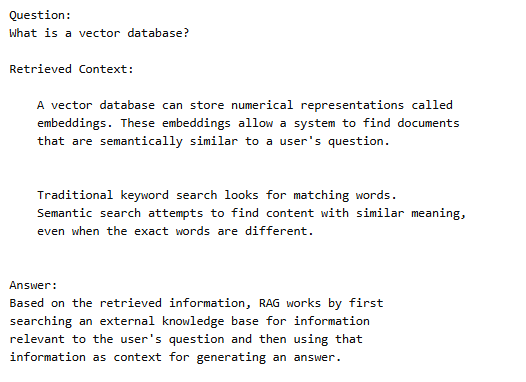
The embeddings and associated text are typically stored in a searchable system. A vector database is commonly used for storing embeddings and associated values. Depending on the application functionality, developers may use technologies such as:
- Pinecone
- Weaviate
- Qdrant
- Milvus
- pgvector
- Elasticsearch
The database allows the system to search for information that is semantically similar to a user’s question.
5. User Asks a Question
Now the user interacts with the AI system.
For example:
“Can I return a product after 30 days?”
The RAG system receives this question.
6. The System Retrieves Relevant Information
The question is converted into an embedding and compared with the stored information in the database. The retrieval system might discover a relevant section:
“Products may be returned within 30 days of purchase if they meet the return conditions.”
That information is selected as context.
7. The AI Generates the Answer
The retrieved information is then provided to the language model along with the user’s question so that it can generate a proper response for the query. The AI can generate an answer such as:
“Yes. Products can be returned within 30 days of purchase, provided they meet the company’s return conditions.”
Instead of asking the AI to remember the company’s policy, the RAG system provides the relevant information when it is needed.
Simple RAG Architecture
A simplified RAG workflow looks like this:
Documents / Knowledge Base
↓
Document Processing
↓
Chunks + Embeddings
↓
Vector Database
↓
User Question
↓
Retrieve Relevant Information
↓
Relevant Context + User Question
↓
Large Language Model
↓
Generated Answer
This architecture allows an AI application to connect a language model with an external knowledge source.
RAG Example: Company AI Chatbot
Imagine a company has an online store with thousands of products.
Customers frequently ask:
- What is the return policy?
- How long does shipping take?
- Does this product have a warranty?
- How can I cancel my order?
- Which payment methods do you accept?
A traditional chatbot may respond with an inaccurate answer if it does not have access to the company’s latest information. A RAG chatbot can connect to the company’s documentation.
When a customer asks:
“Does this laptop have a two-year warranty?”
The RAG system searches the company’s product documentation.
It finds:
“This laptop includes a two-year manufacturer warranty.”
The AI then uses that information to generate the response. This is one reason RAG is particularly useful for company knowledge assistants and customer-support chatbots.
RAG vs. Traditional AI Chatbots
A traditional AI chatbot typically relies heavily on the data provided during the model’s training phase. A RAG chatbot adds an external retrieval layer.
| Feature | Traditional AI Chatbot | RAG Chatbot |
|---|---|---|
| External knowledge | Limited | Yes |
| Private company data | Requires additional approach | Can retrieve it |
| Frequently changing information | Can be difficult | Easier to update |
| Document search | Limited | Strong |
| Knowledge base integration | Limited | Common |
| Model retraining required for every document update | Not necessarily applicable | Usually not required |
| Responses based on retrieved documents | No | Yes |
RAG does not automatically make an AI system accurate, but it provides a way to give the model relevant information at the time a question is asked.
RAG vs. Fine-Tuning
RAG and fine-tuning are often confused by many AI engineers, but they solve different problems and have their own working mechanisms.
Fine-Tuning
Fine-tuning modifies a model’s behavior by training it on additional examples. It can be useful when you want a model to:
- Follow a particular style
- Perform a specialized task
- Produce a particular type of output
- Behave according to specific patterns
RAG
RAG provides external information to the model when it generates an answer. It is useful when you want an AI system to:
- Search documents
- Access company knowledge
- Work with changing information
- Answer questions about a knowledge base
- Use private or domain-specific information
Which Should You Use?
It depends on the problem and the business domain. If your goal is:
“Make the AI answer questions using our latest documentation.”
RAG may be a good approach.
If your goal is:
“Make the AI consistently respond in a particular format or style.”
Fine-tuning may be more appropriate. In some advanced applications, organizations utilize both techniques.
Does RAG Prevent AI Hallucinations?
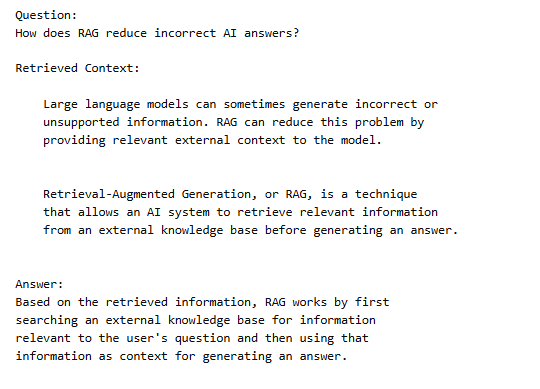
RAG can reduce some types of hallucinations, but it does not completely eliminate them. An AI hallucination occurs when a model produces information that is inaccurate, unsupported, or outdated.
Without external context, a model may attempt to answer a question using its learned knowledge. With RAG, the system can provide relevant documents as context.
For example:
Question:
“What is our company’s refund period?”
The RAG system can retrieve the company’s refund policy and provide it to the model. This gives the model a reliable source to work from. However, several problems can still occur.
The retrieval system might:
- Retrieve the wrong document
- Miss the relevant information
- Retrieve outdated information
- Retrieve incomplete information
The language model could also misunderstand or incorrectly interpret the user queries. Therefore, RAG should not be treated as a magic solution to AI hallucinations. A well-designed RAG system needs good documents, effective retrieval, appropriate prompts, testing, and monitoring.
Benefits of RAG
RAG has gained popularity because it solves several practical problems associated with generative AI.
1. Access to External Knowledge
RAG allows AI applications to use information outside the model itself. This is useful for company-specific knowledge.
2. Easier Knowledge Updates
When information changes, developers can often update the knowledge source instead of retraining the entire language model. For example, a company could update its product documentation and make the updated information available to its RAG system.
3. Works With Private Information
Organizations can build systems that retrieve information from controlled knowledge bases.
This can be useful for internal documentation and business processes.
4. Better Answers for Specialized Questions
A general AI model may not know the details of a specific company, product, or internal process. RAG gives the model access to relevant domain information.
5. Useful for Document Search
Instead of manually searching through hundreds of documents, users can ask questions in natural language. This can make large knowledge bases easier to use.
Limitations of RAG
Like any other technology, RAG also has limitations.
Retrieval Quality Matters
If the system finds irrelevant information, the AI may receive poor context. The quality of the final answer can therefore depend heavily on the quality of retrieval.
Poor Documents Produce Poor Results
If your knowledge base contains outdated, contradictory, or incomplete information, the AI may produce poor answers.
More Technical Complexity
A RAG system requires additional components such as document processing, embeddings, retrieval, storage, and monitoring. This can make RAG applications more complicated than a basic chatbot and may require more time and energy.
It Does Not Guarantee Accuracy
Even with relevant documents passed, the AI can still misunderstand the information or generate an incorrect response.
Security Must Be Considered
Private company information needs to be handled carefully, and the risk of being exposed is high if not handled correctly. Access controls, data protection, authentication, and secure storage are important when building production RAG systems.
Where Is RAG Used?
RAG can be used in many different applications.
Customer Support
Businesses can create AI assistants that answer questions using product documentation and support articles.
Internal Company Assistants
Employees can ask questions about:
- HR policies
- Company procedures
- Technical documentation
- Internal processes
Education
Educational applications can use RAG to search textbooks, course materials, and other learning resources.
Legal Research
RAG systems can help search large collections of legal documents, although professional review remains important for high-stakes legal work.
Healthcare Information Systems
RAG can help retrieve information from approved medical documentation, but healthcare applications require strong safeguards and professional oversight.
Technical Documentation
Developers can use RAG systems to search documentation and find relevant technical information.
E-Commerce
Online stores can use RAG to answer questions about:
- Products
- Shipping
- Returns
- Warranty
- Policies
RAG and AI Agents
RAG is also useful in modern AI agent systems. An AI agent may need access to information before deciding what action to take. For example, a business AI agent might:
- Receive a customer question.
- Retrieve the customer’s account information.
- Search the company’s policies.
- Determine the appropriate response.
- Take an approved action.
- Respond to the customer.
In this situation, RAG can act as a knowledge layer that gives the AI agent access to relevant information. However, RAG and AI agents are not the same thing.
RAG is primarily a method for retrieving and providing knowledge. An AI agent generally involves reasoning, planning, tool usage, and actions. A modern AI system can use both.
How Is RAG Different From a Search Engine?
RAG and traditional search engines can both retrieve information, but their working pattern and use case are different. A search engine usually returns a list of documents or webpages available on the internet.
A RAG system retrieves relevant information and provides it to a language model, which can then generate a conversational answer to the question.
For example:
Traditional search:
Search results → webpages → user reads information
RAG:
Question → retrieve relevant information → AI processes context → generated answer
RAG can therefore provide a more conversational experience.
What Tools Are Used to Build RAG Systems?
A RAG application usually involves multiple components rather than a single tool. Common components include:
Large Language Models
An LLM generates the final response.
Embedding Models
Embedding models convert text into numerical representations that can be used for semantic search.
Vector Databases
Vector databases store and retrieve embeddings.
Examples include:
- Pinecone
- Weaviate
- Qdrant
- Milvus
- pgvector
Document Processing
Documents need to be extracted, cleaned, and divided into useful chunks before they can be indexed.
Application Frameworks
Developers can use AI development frameworks to connect retrieval systems, models, tools, and application logic. The exact technology stack depends on the requirements of the project.
How to Build a Simple RAG System
A basic RAG application can be summarized in these stages:
Step 1: Choose Your Knowledge Source
Start with a small collection of useful documents.
Step 2: Extract the Text
Convert PDFs, webpages, or other documents into usable text.
Step 3: Split the Text
Divide large documents into smaller chunks.
Step 4: Generate Embeddings
Convert the chunks into vector representations.
Step 5: Store the Embeddings
Store them in a vector database or another searchable system.
Step 6: Process the User Question
Convert the user’s question into an embedding.
Step 7: Retrieve Relevant Chunks
Search the knowledge base for the most relevant information.
Step 8: Send Context to the LLM
Provide the retrieved information along with the user’s question.
Step 9: Generate the Answer
The language model produces the final response.
Step 10: Test the System
Test the system with real questions and check whether the retrieved information and generated answers are accurate.
How Businesses Can Use RAG
Businesses don’t necessarily need to build an extremely complicated AI system. A small organization could start with a focused use case.
For example, a company could create a RAG-powered internal assistant that answers questions about its documentation. Instead of asking employees to search through dozens of PDFs, they could ask:
“What is the procedure for requesting annual leave?”
The system searches the relevant company documentation and provides an answer. Another example is a customer-support assistant.
A business could connect:
- Product documentation
- FAQs
- Shipping information
- Return policies
- Warranty documents
The assistant could then answer common customer questions using those sources.
RAG Security and Privacy Considerations
RAG systems can work with sensitive information, so security should be considered from the beginning.
Important areas include:
Access Control
Not every user should necessarily have access to every document.
Data Protection
Sensitive information should be stored and transmitted securely.
Document Permissions
The retrieval system should respect the permissions associated with different documents.
Prompt Injection
Untrusted content can potentially contain instructions designed to manipulate an AI system.
RAG applications should therefore be designed to distinguish between trusted system instructions and untrusted retrieved content.
Data Quality
Old or incorrect documents can result in incorrect answers. Organizations should regularly review and update their knowledge sources.
Is RAG Better Than Fine-Tuning?
Neither technology is the final winner. They solve different problems and have their own functionality. Choose RAG when your primary requirement is giving an AI model access to external or frequently changing information.
Consider fine-tuning when your primary requirement is changing how the model behaves or performs a specialized task. For some applications, a combination of RAG and fine-tuning may be appropriate.
The right architecture depends on the use case, data, performance requirements, security requirements, and available resources.
Final Thoughts
Retrieval-Augmented Generation, or RAG, is one of the most useful methods for connecting generative AI with external knowledge.
Instead of expecting a language model to know every piece of information, RAG allows an application to retrieve relevant information when it is needed.
The basic process is:
Collect information → Process documents → Create embeddings → Store knowledge → Retrieve relevant information → Generate an answer
This approach can be useful for customer-support assistants, internal company tools, document search, educational applications, technical documentation, and many other AI systems.
However, RAG is not guaranteed to be 100% accurate. The quality of the underlying documents, retrieval system, prompts, model, security controls, and testing process all affect the final result.
For businesses exploring AI, understanding RAG is important because it provides a practical way to build AI applications that can work with specific, private, and changing information without necessarily training a new language model from scratch.
As generative AI continues to move from general-purpose chatbots toward specialized business applications and AI agents, RAG is likely to remain an important part of the technology stack.
Stay Ahead with ControlOwl
Get the latest AI tools, software tips, tutorials, and technology insights delivered straight to your inbox.